

Apple AirTag (2nd Generation) Review: A Subtle but Meaningful Upgrade for Everyday Tracking
Introduction
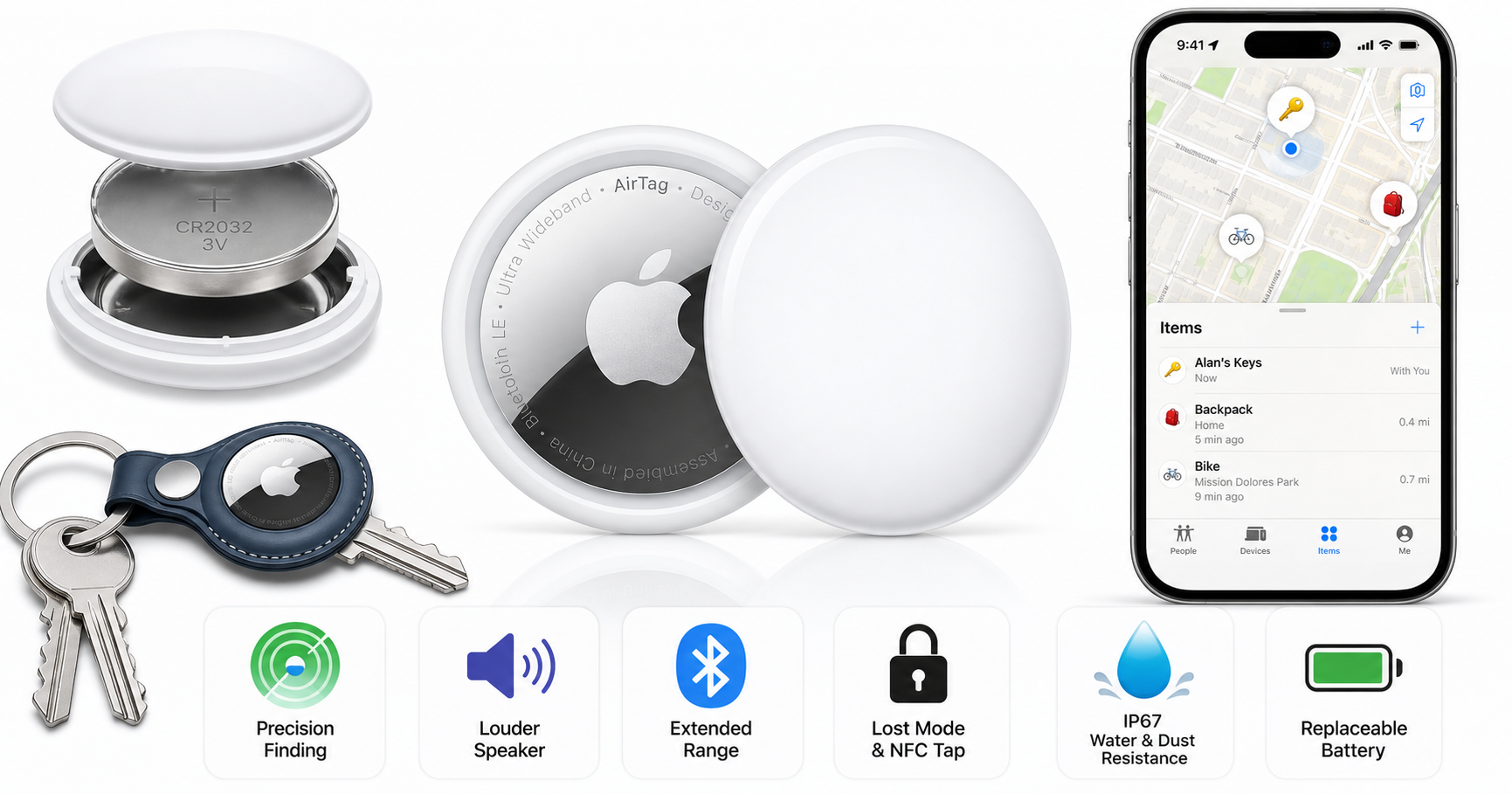
Apple’s second‑generation AirTag is a small update on paper, but it targets exactly what matters for an item tracker: finding things more easily and more reliably. The Apple AirTag (2nd Generation) maintains the same minimal, button‑style design as the first model, yet introduces a louder speaker, stronger Bluetooth connectivity, and an upgraded Ultra Wideband (U2) chip to extend Precision Finding range and improve accuracy.
If you already live inside Apple’s ecosystem and frequently misplace keys, wallets, bags, or luggage, this tracker is designed to integrate seamlessly with the Find My app and your existing devices. Sold individually or in multipacks on retailers like Amazon (with pricing typically around $24.00 for a single unit at this listing), it aims to be a low‑maintenance, set‑and‑forget accessory.
Product overview and key features
Design and build
At a glance, the 2nd‑gen AirTag looks almost identical to the original:
- Compact, disc‑shaped form factor: about 1.26 inches (31.9 mm) in diameter and 0.31 inches (8.0 mm) thick, still small enough for a keyring accessory, wallet insert, or bag pocket.
- Lightweight: roughly 11.8 g, only slightly heavier than the first‑generation model, and still unobtrusive on a keychain.
- Materials and finish: a white plastic front with a polished metallic back, ready for engraving if purchased directly from Apple.
- No built‑in loop: as with the first generation, you’ll need a separate keyring, holder, or wallet sleeve if you want to attach it securely to keys, bags, or a pet collar.
Durability remains similar:
- IP67 water and dust resistance: rated for immersion in up to 1 meter of water for up to 30 minutes, making it suitable for everyday spills, rain, and general rough‑and‑tumble use.
Power and maintenance
Apple continues with a pragmatic approach to power:
- User‑replaceable CR2032 coin cell battery: accessible by twisting off the back cover.
- Battery life: typically “more than a year” under normal use conditions, depending on how frequently it plays sounds or is placed into Lost Mode.
This design keeps ongoing costs predictable and avoids the need for charging cables or docks.
Connectivity and tracking tech
The biggest changes are invisible but important:
- Bluetooth with extended range: improved Bluetooth hardware offers longer range compared with the original AirTag, allowing your iPhone or other nearby Apple devices in the Find My network to detect the tracker from farther away.
- Second‑generation Ultra Wideband (U2) chip: this is the same new generation chip appearing in recent iPhone and Apple Watch models, enabling up to roughly 1.5× the Precision Finding range versus the first‑gen AirTag when used with compatible devices.
- NFC tap for Lost Mode: if someone else finds your AirTag, they can tap it with an NFC‑compatible smartphone to view a webpage with your contact information (if you’ve enabled this in Lost Mode).
Compatibility
System requirements are stricter than before:
- iPhone: requires iOS 26.0 or later.
- iPad: requires iPadOS 26.0 or later.
- Apple Watch Precision Finding: expanded Precision Finding now works with newer Apple Watch models (such as Apple Watch Series 9 and Ultra‑class models with the latest watchOS), letting you follow on‑wrist directions to your AirTag.
If you use older Apple hardware that cannot update to recent OS versions, this is an important point to check before buying.
Core features at a glance
- Find My integration: see your AirTag on a map, get directions, or put it in Lost Mode.
- Precision Finding: on compatible iPhone and Apple Watch models, your device can show an arrow with distance and direction to your AirTag using Ultra Wideband.
- Audible alerts: a built‑in speaker plays a louder, more distinctive chime than the first‑gen model, making it easier to follow sound to your item.
- Anti‑stalking protections: like the original, AirTag includes software features designed to alert people if an unknown AirTag appears to be moving with them over time.
Performance and user experience
Setup and day‑to‑day use
The AirTag’s setup experience is intentionally simple:
- Bring the AirTag near your iPhone or iPad.
- A pairing card pops up automatically.
- Assign a name (Keys, Wallet, Backpack, etc.).
- The AirTag is added to your Apple ID and appears in the Find My app.
From there, using it is largely passive: you attach the AirTag to an item and let the Find My network do the work. When you misplace something, you have multiple options:
- Play Sound to trigger the on‑device speaker.
- Use Precision Finding on compatible devices to follow on‑screen arrows and distance markers.
- View location history (in the sense of last known positions) and directions in the Find My app.
- Enable Lost Mode to receive a notification when another Apple device detects your AirTag and to share contact details with whoever finds it.
Range and Precision Finding
The most meaningful upgrade here is the combination of stronger Bluetooth and the U2 Ultra Wideband chip:
- Longer Bluetooth range means your AirTag is more likely to be detected by your own iPhone or by nearby devices in the Find My network, especially in open spaces or large indoor areas.
- Improved Precision Finding extends how far away you can still get a usable directional arrow and distance readout. Apple advertises up to around 50% better range in this mode compared with the original AirTag when used with fully compatible iPhones.
In practical terms, this helps in scenarios like:
- Locating keys left in another room or on a different floor in your home.
- Finding a suitcase in a crowded baggage carousel area.
- Tracking down a backpack in a large office or campus building.
The longer range does depend on having newer Apple hardware. If you’re pairing the AirTag (2nd Gen) with an older iPhone that lacks the newest U2 chip, you’ll still see benefits, but the gap versus the original AirTag may be smaller.
Audio alerts and speaker volume
One of the biggest complaints about the first‑generation AirTag was that the speaker wasn’t always loud enough in noisy environments or when buried under cushions or inside luggage.
The 2nd‑gen AirTag addresses this with:
- Up to 50% louder speaker output, according to Apple and third‑party testing.
- A new, more distinctive chime aimed at cutting through background noise.
In real‑world terms, you are more likely to hear the AirTag in situations like:
- Keys lost between couch cushions.
- A bag placed in the trunk of a car.
- A backpack left in a noisy hallway.
Reliability and firmware updates
Like the original, the new AirTag’s firmware updates automatically in the background via your iPhone when certain conditions are met (sufficient battery, proximity, etc.). There is no manual update button, so occasionally updates may take some time to apply, but they require no active management from the user.
Everyday scenarios
Common examples where the AirTag (2nd Generation) performs well include:
- Key finder: attach it to a keychain using a compatible holder. Misplaced keys can quickly be located using a combination of sound and Precision Finding.
- Wallet and card holders: tucked into a slim wallet insert, it offers a good balance of size and tracking capability, though it is slightly thicker than dedicated credit‑card‑style trackers.
- Travel and luggage: placed in a suitcase or carry‑on, it can provide reassurance during flights and transfers. You can see whether your luggage made the same flight and roughly where it is within the airport’s baggage handling.
- Bags and backpacks: ideal for students, commuters, or anyone who moves between locations frequently.
Users moving from the first‑generation AirTag will appreciate the quieter upgrade path: existing holders, keyrings, and luggage compartments generally remain compatible, so you do not need to rebuy accessories.
Pros and cons
Pros
- Substantially improved finding range with updated Bluetooth and U2 Ultra Wideband chip, particularly noticeable with newer iPhones and Apple Watch models.
- Louder, clearer speaker with a more distinctive chime, making on‑device sound alerts easier to hear when items are buried or in noisy environments.
- Tight integration with the Find My network, leveraging millions of Apple devices for crowd‑sourced location data.
- Simple, one‑tap setup and a very low‑maintenance ownership experience.
- User‑replaceable CR2032 battery with more than a year of typical battery life.
- IP67 water and dust resistance, suitable for everyday use and minor exposure to the elements.
- Backwards accessory compatibility with most existing AirTag holders and mounts.
- Compact and lightweight form factor that works well for keys, bags, and small items.
Cons
- Still requires accessories for attachment: there is no built‑in keyring hole or clip, so you’ll likely need to purchase or reuse a separate holder for keys or pet collars.
- Apple‑only ecosystem: it’s designed primarily for iPhone, iPad, and Apple Watch users; Android integration is limited to reading an AirTag in Lost Mode via NFC.
- Strict OS requirements: older Apple devices that cannot run the latest iOS/iPadOS/watchOS versions may not support all features, especially expanded Precision Finding.
- Not ideal for real‑time tracking of fast‑moving targets (like high‑speed vehicles) since updates depend on proximity to other devices in the Find My network.
- Design similarity may cause confusion: at a glance, the 2nd‑gen AirTag looks almost identical to the first‑gen, making it harder to differentiate mixed batches.
Conclusion and recommendation
The Apple AirTag (2nd Generation) is an evolutionary, not revolutionary, update—but for a product whose job is simply to help you find lost items, the changes are meaningful. A louder speaker and extended Precision Finding range address two of the most common complaints about the original model, while maintaining familiar strengths like long battery life, IP67 protection, and deep integration with Apple’s Find My network.
You should consider this tracker if:
- You regularly misplace keys, wallets, bags, or luggage and already use an iPhone or iPad.
- You want an item tracker that “just works” with minimal setup and no charging routine.
- You own or plan to buy newer Apple hardware that can take full advantage of the U2 chip’s extended Precision Finding capabilities.
The 2nd‑generation AirTag is especially compelling for first‑time buyers and for users upgrading from older, non‑Ultra‑Wideband trackers. Owners of original AirTags may find it a more modest upgrade; however, the increased range and louder speaker can justify replacing or mixing in second‑generation units for items that are often misplaced or especially important.
Overall, the AirTag (2nd Generation) refines a proven formula. If you’re deep in Apple’s ecosystem and want a small, reliable way to keep tabs on everyday items, it’s an easy recommendation—especially when you can pick one up from Amazon at around $24.00 per unit on this specific listing: https://www.amazon.com/dp/B0GJTFXNRX.