

MOSISO MacBook Neo 13-inch (2026) Case Review: Clear, Precise Protection for Apple’s Entry-Level MacBook
Overview
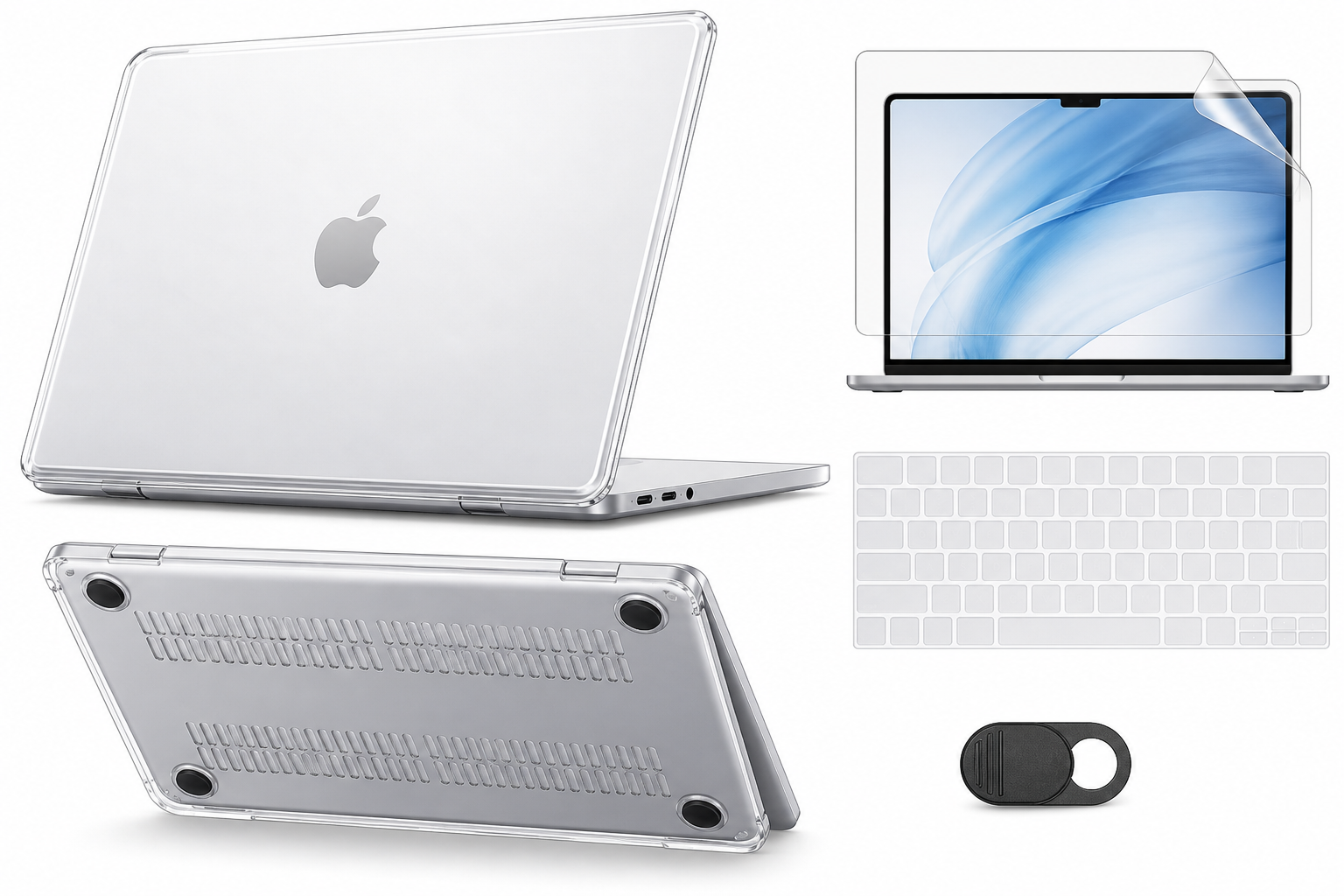
The MOSISO Compatible with MacBook Neo Case 13 inch 2026 A3404 A18 Pro Chip | 4 in 1 Kit Precision Fit Crack & Scratch Resistant Protective Hard Shell Case Cover, Crystal Clear is purpose-built for Apple’s 13‑inch MacBook Neo (model A3404, 2026 release, A18 Pro chip). It targets users who want rigid, transparent protection without obscuring the Neo’s aluminum finish or adding excessive bulk.
The kit typically includes:
- A crystal clear hard shell (top and bottom) tailored to the 13‑inch MacBook Neo A3404
- A keyboard cover matched to the Neo’s layout
- A screen protector to guard against minor scuffs
- A small extra accessory (commonly a webcam cover or similar) depending on the exact kit revision
Positioned as an affordable all-in-one protection bundle at around $9.99, this MOSISO kit aims to cover the main wear and tear points—lid, base, keyboard, and display—in a single purchase.
Standout Features
1. Precise Compatibility with MacBook Neo A3404
Unlike generic 13‑inch notebook shells, this case is specifically molded for the MacBook Neo 13-inch (2026) A3404 form factor, including:
- Cutouts for the Neo’s two USB‑C ports and headphone jack
- Openings for the rear hinge line and venting
- Alignment with the Neo’s rubber feet to keep the machine stable on flat surfaces
A precise fit is critical on the Neo because generic Air/Pro cases often misalign at the hinge and along the display frame. This MOSISO model is explicitly marketed against the A3404, reducing the risk of hinge stress from ill-fitting clips.
2. Crystal Clear, Crack & Scratch Resistant Shell
The shell is constructed from clear polycarbonate-style plastic designed to balance rigidity, clarity, and impact dispersion:
- Clarity: The finish is fully transparent, preserving the Neo’s color and Apple logo rather than covering it with opaque plastic.
- Scratch resistance: The outer surface is harder than bare aluminum, helping to prevent scuffs from desks, bags, and shared workspaces.
- Crack resistance: Reinforced edges and corners are intended to reduce spider-cracking—a common failure mode for thin, clear shells.
For students, commuters, or office users who frequently move the Neo between environments, this outer shield provides a sacrificial layer for everyday dings and abrasion.
3. 4-in-1 Protection Bundle
Instead of requiring separate purchases for each accessory, MOSISO packages:
- Hard shell case (top and bottom) for impact and scratch protection
- Keyboard cover for dust, crumbs, and minor liquid splash resistance
- Screen protector to reduce risk of hairline scratches from debris trapped between keys and display
- A small bonus accessory (such as a webcam cover in many MOSISO kits) for additional privacy or protection
The bundle approach keeps the overall cost-to-coverage ratio competitive: buying each item individually from different brands would typically cost more than a unified kit like this, even before factoring in compatibility tuning.
Supporting Features
Ventilation Cutouts and Rubber Feet Alignment
The bottom shell incorporates ventilation slots and is shaped to respect the MacBook Neo’s built-in airflow design. While the A18 Pro is notably efficient, long compile sessions, media exports, or sustained AI workloads can still generate heat. Cutouts around the venting paths and edges help avoid fully trapping warm air.
In addition, the bottom piece is contoured so the Neo’s original rubber feet remain in contact with the desk, preserving much of the stock stability and slight elevation off the surface.
Snap-On Design and Tool-Free Installation
Both the top and bottom components are snap-on panels that attach via molded clips. They do not require adhesive or screws and can be removed without tools. This design allows:
- Quick installation for new Neo owners
- Easy removal for periodic cleaning
- Replacement of individual pieces if damaged
While snap-on clips can break over time on any thin plastic case, careful installation and removal (starting at corners, avoiding forcing clips) help maximize longevity.
Anti-Slip and Scratch Protection for Desks
The hard shell extends slightly beyond the Neo’s aluminum base, functioning as a sacrificial layer between the laptop and surfaces. This is especially useful on:
- Coarse or unfinished wooden desks
- Cafe tables and coworking benches
- Shared desks with unseen debris
By letting the plastic, not the MacBook, take the brunt of friction, the case helps preserve resale value and cosmetic condition.
Keyboard and Screen Protection
The keyboard cover is thin TPU or silicone that conforms to the Neo’s layout. It provides:
- A barrier against dust and crumbs
- Limited protection against very small spills or splashes
- An extra layer between keys and display when the lid is closed, which can help limit keycap-shaped smudges
The screen protector is designed to be crystal clear, aiming to avoid noticeable color cast or sharpness loss while adding a modest scratch barrier.
Usability
Installation Experience
For most users, installation is straightforward:
- Clean the MacBook Neo’s surfaces to remove dust and oils.
- Align and snap on the bottom shell, typically starting from the back hinge side.
- Snap on the top shell around the display, again starting from a long edge and working around.
- Apply the screen protector with the usual dust-removal steps and alignment to the bezel.
- Lay the keyboard cover over the keys.
The case is designed to avoid obstructing the hinge, ports, or lid closure, so once fitted correctly, it should open and close with near-stock resistance.
Day-to-Day Handling
In regular use, the MOSISO case adds a thin plastic layer but does not heavily change the MacBook Neo’s profile:
- Thickness: The added bulk is noticeable in hand but modest; it still fits in most 13‑inch laptop sleeves and backpacks.
- Grip: Smooth plastic can feel slightly more slippery than raw anodized aluminum, but many users appreciate the consistent feel, especially on older or worn desks.
- Weight: The extra weight is minor relative to the Neo’s base mass and unlikely to impact portability for most users.
The keyboard cover may slightly alter key feel and sound, making keystrokes quieter and marginally softer. Users who are highly sensitive to keyboard feedback might prefer using it only in riskier environments (e.g., around food and drinks).
Fit and Finish
Because this model is targeted specifically at the A3404, alignment of cutouts and clips is typically better than one-size-fits-many shells. The top shell should:
- Hug the display lid without bowing
- Avoid catching on the hinge line
- Leave clearance for the display to open fully without rubbing the case edges against the lower chassis
The bottom piece should clip securely without flexing into the vents or ports. Any sign of consistent creaking or misalignment usually indicates incomplete installation or, less commonly, a manufacturing tolerance issue.
Performance
Protection Performance
This MOSISO kit is optimized for cosmetic and light-impact protection, not for drop-proof ruggedization. In practice, it offers:
- Excellent scratch protection for the lid and bottom panel
- A first line of defense against minor bumps inside bags or when sliding the Neo across desks
- Protection from edge dings where the plastic slightly overlaps the aluminum
However, for high-drop or heavy-impact scenarios, the slim shell is not a substitute for a padded sleeve or fully ruggedized case.
Thermal Considerations
A common concern with any hard shell on thin laptops is heat buildup. The MacBook Neo’s A18 Pro is efficient, but tasks like extended video calls, multi-hour browsing with many tabs, or code compilation can warm the chassis.
This case mitigates some risk via vent cutouts, but it still:
- Adds an insulating plastic layer over the aluminum that would otherwise radiate heat
- Slightly reduces direct contact between the metal base and ambient air
In typical light-to-moderate usage, most users should not see severe thermal throttling attributable solely to the case. For sustained heavy workloads, it remains best practice to use the Neo on a hard, flat surface and periodically check for excessive warmth. Users especially concerned about thermals may choose to remove the bottom shell during intensive sessions while keeping the top cover on for scratch protection.
Port Access and Wireless Performance
The clear plastic is radio-transparent, so Wi‑Fi and Bluetooth behavior should remain effectively unchanged. Port cutouts around the USB‑C connectors and headphone jack are generous enough to accommodate most straight, non-bulky plugs and cables. Very thick or L‑shaped connectors may fit more tightly.
Pros and Cons
Pros
- Purpose-built for MacBook Neo 13-inch (2026, A3404) with accurate cutouts and clips
- Crystal clear finish preserves the Neo’s appearance and color
- Crack & scratch resistant hard shell protects against everyday wear
- 4-in-1 kit consolidates hard shell, keyboard cover, screen protector, and small accessory in one purchase
- Tool-free snap-on design is quick to install and remove
- Bottom shell and cutouts are shaped to respect vents and rubber feet, supporting stable placement
- Keyboard cover helps guard against dust and minor splashes
- Screen protector adds a thin sacrificial layer over the display
Cons
- As with most thin plastic shells, this is not a rugged or shockproof solution for high drops
- The keyboard cover can slightly alter key feel and quietness, which some typists dislike
- Any hard shell may modestly reduce passive cooling efficiency under sustained heavy load
- Snap-on clips can wear or crack over time if the case is frequently removed and reattached
- Crystal clear plastic can show fingerprints and micro-scratches more visibly than opaque finishes
Summary
The MOSISO Compatible with MacBook Neo Case 13 inch 2026 A3404 A18 Pro Chip, 4 in 1 Kit, is a well-targeted protection bundle for owners of Apple’s entry-level MacBook Neo who want to preserve the laptop’s pristine look while guarding against everyday scuffs and minor knocks. Its crystal clear, crack- and scratch-resistant hard shell pairs with a keyboard cover and screen protector to deliver full-surface coverage without significantly altering the Neo’s silhouette.
If you prioritize cosmetic protection, resale value, and an all-in-one accessory kit at a budget-friendly price like $9.99, this MOSISO case is a strong contender. Users who routinely push the Neo under heavy thermal load or who are extremely sensitive to keyboard feel may prefer to use only parts of the kit (such as just the top shell) or rely on a padded sleeve instead of a full-time hard case. For most students, remote workers, and general users, however, it offers a practical balance of clarity, protection, and convenience.