

Xbox Wireless Gaming Controller + USB-C Cable (2025, Carbon Black) Review: A Versatile All-Rounder for Multi-Platform Play
Introduction
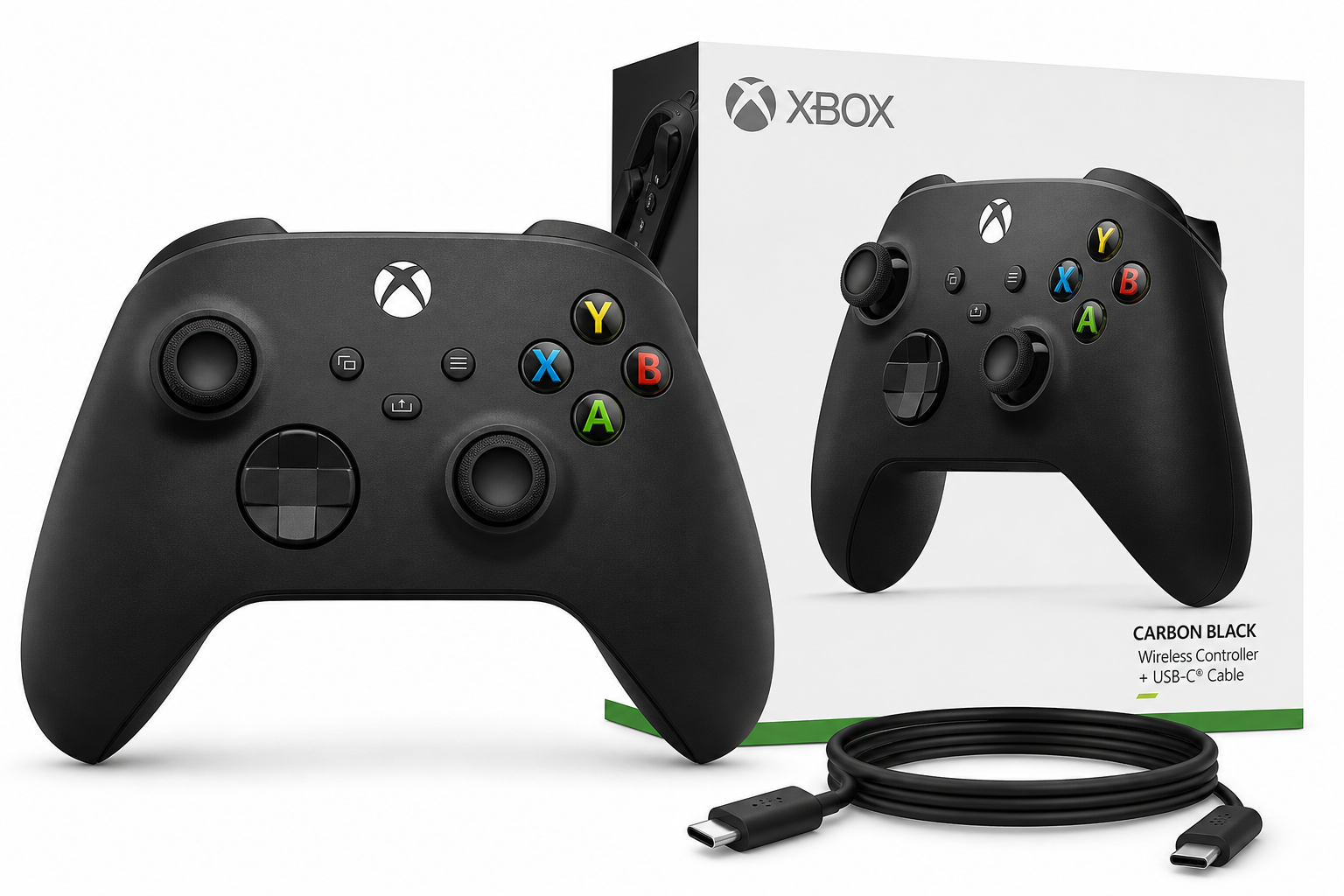
The Xbox Wireless Gaming Controller + USB‑C Cable (2025) – Carbon Black targets players who split their time between console, PC, mobile, streaming devices, and VR headsets. Building on the proven Xbox Series X|S controller design, this bundle adds an official USB‑C cable for reliable wired play alongside Xbox Wireless and Bluetooth connectivity.
Positioned around $51.57 on Amazon, it’s intended as a dependable “one controller for almost everything” rather than a premium pro pad. The question is whether its design refinements and broad compatibility justify choosing it over cheaper third‑party pads or more advanced options with extra features.
Key Points
- Platform coverage: Designed to work with Xbox Series X|S, Xbox One, Windows PCs, Android, iOS, many smart TVs, Fire TV sticks, and a wide range of VR headsets.
- Connectivity choices: Xbox Wireless for consoles, Bluetooth for mobile and many TVs/headsets, and wired play via the included USB‑C cable.
- Comfort and build: Familiar Xbox ergonomics with sculpted grips, balanced weight, and a lightly textured back and triggers for better control.
- Controls and features: Hybrid D‑pad, 3.5 mm audio jack, responsive face buttons, and a dedicated Share button for screenshots and clips.
- Power: Runs on AA batteries by default, with optional rechargeable battery packs available separately.
- Use cases: Equally at home as a main Xbox controller, a go‑to PC gamepad, or a travel controller for cloud gaming and VR.
Experience
Design and ergonomics
In hand, the 2025 Carbon Black model closely matches the current Xbox Series X|S controller form factor. The shell is slightly more compact than older Xbox One pads, but the grips remain substantial enough for medium and large hands. The textured finish on the triggers and rear shell offers extra traction without feeling abrasive during long sessions.
The overall weight with standard AA batteries lands in a comfortable middle ground: light enough for extended play, but not so light that it feels hollow. Button travel and resistance are familiar if you’ve used an Xbox controller before, which helps muscle memory transfer instantly from console to PC or mobile.
Buttons, sticks, and D‑pad
Microsoft’s hybrid D‑pad is one of the standout elements. It combines a traditional cross with a shallow, circular dish that makes diagonal inputs more consistent, which benefits fighting games, platformers, and menu navigation. It’s noticeably more precise and less “mushy” than older D‑pads on early Xbox One controllers.
Analog sticks have a moderate tension that works well for both shooters and driving games. The small, textured rings around the stick caps help prevent slipping without digging into your thumbs. Triggers and bumpers are crisp; the trigger pull is smooth, and the actuation point is predictable, which is important for racing titles and shooters where partial pulls matter.
The Share button sits between the View and Menu buttons and lets you capture screenshots or clips with a single press when supported by the platform (Xbox consoles and Windows with the Xbox app in particular). On other platforms, it may map to a generic input, depending on the game or OS.
Connectivity and setup
Where this bundle differentiates itself is in its connectivity options:
- Xbox consoles: Pairing with Xbox Series X|S or Xbox One uses Xbox Wireless. Press the pairing button on both the console and the controller, and it syncs within seconds. Once paired, the controller typically reconnects as soon as you power on.
- Windows PCs: You can connect via Bluetooth, use the included USB‑C cable for a direct wired connection, or pair with an optional Xbox Wireless adapter. Windows 10 and 11 generally recognize the pad immediately, and most modern games ship with built‑in Xbox button prompts.
- Android and iOS: Mobile pairing is done over Bluetooth. The controller shows up as an Xbox gamepad in system settings, and many cloud‑gaming apps and native games support it out of the box.
- Fire TV sticks, smart TVs, and VR headsets: Many newer streaming devices and standalone headsets support standard Bluetooth gamepads. Once in pairing mode, the Xbox controller typically appears as a compatible device. Some TV and VR interfaces show generic on‑screen icons rather than Xbox button labels, but the inputs map cleanly in most supported games.
The bundled USB‑C cable is useful for PCs, laptops, and some VR headsets that support wired connections. Wired play also eliminates potential wireless interference and removes input lag concerns for competitive titles.
Latency and reliability
Latency over Xbox Wireless and wired USB‑C is very low and consistent, well suited for fast shooters and fighting games. Bluetooth performance varies more by device: on a modern phone or laptop, it’s usually responsive, but older or congested Bluetooth stacks can introduce occasional stutter. For critical multiplayer games on PC, a wired or Xbox Wireless connection is still preferable.
Once paired, the controller tends to reconnect predictably to the last device it was used with. If you rotate between PC, console, and mobile, you’ll still need to re‑enter pairing mode to switch contexts, but that’s a limitation shared by most multi‑platform controllers.
Power and battery life
The controller uses two AA batteries. With moderate use over Xbox Wireless or Bluetooth, it can last many tens of hours before needing replacements, depending on vibration intensity and headset use. Users who dislike disposable batteries can add a rechargeable battery pack that charges via USB‑C, but that accessory is sold separately.
One practical benefit of the removable‑battery design is that the controller’s usable life isn’t tied to a built‑in battery cell. As long as the buttons and sticks hold up, you can keep it running with new AAs or rechargeable packs years down the line.
Everyday use across devices
As a daily driver on Xbox and PC, the controller feels predictable and robust. Most AAA titles on Windows surface Xbox button prompts by default, and Steam, the Xbox app, and many launchers treat it as a first‑class citizen.
On Android, iOS, and Fire TV, it’s especially well suited for cloud gaming services and controller‑ready mobile titles. Paired with a phone clip or stand, it offers a console‑like experience on the go. For VR headsets, it’s a solid option for flat‑screen ports and streaming PC games into VR, though precise behavior will vary by headset brand and software.
Pros
- Wide platform compatibility: Works with Xbox, Windows PCs, Android, iOS, many smart TVs, Fire TV sticks, and numerous VR headsets.
- Multiple connection methods: Xbox Wireless, Bluetooth, and wired USB‑C give you flexibility across devices.
- Comfortable, familiar ergonomics: Sculpted grips and balanced weight suit long play sessions.
- Hybrid D‑pad and textured controls: More precision and better grip compared to older Xbox pads.
- Share button: Quick access to screenshots and clips on supported platforms.
- 3.5 mm audio jack: Simple headset connection on Xbox and PC (with wired or Xbox Wireless).
- Removable batteries: Easy to swap AAs or upgrade to a rechargeable pack later.
- Official USB‑C cable included: Ready for wired play on PCs and compatible devices out of the box.
Cons
- No built‑in rechargeable battery: Requires AA batteries or a separate rechargeable kit.
- No back paddles or advanced customization: Lacks the extra inputs and deep tweaking found on “pro” controllers.
- Bluetooth performance can vary: Minor latency or drop‑outs are possible on some devices compared with wired or Xbox Wireless.
- Limited haptics vs. premium pads: Standard rumble only; no advanced adaptive triggers or nuanced haptic feedback.
- Switching devices isn’t seamless: Moving between console, PC, and mobile requires re‑pairing steps.
Verdict
The Xbox Wireless Gaming Controller + USB‑C Cable (2025, Carbon Black) is a well‑rounded, no‑nonsense choice for players who want one controller that works comfortably across Xbox, PC, mobile, streaming devices, and VR. It doesn’t try to compete with elite‑tier gamepads on features, nor is it the cheapest third‑party option, but it delivers reliable input, broad compatibility, and a mature design that’s easy to live with.
If you value consistent feel across all your gaming platforms and want an officially supported controller that “just works” in most situations, this bundle at around $51.57 is a strong, practical pick. Competitive players seeking extra paddles or integrated rechargeable batteries may still gravitate toward higher‑end options, but for the majority of multi‑platform gamers, this Carbon Black Xbox controller remains a safe and sensible default.