

Pack of 2 Replacement Roku TV Remotes: Simple, Wide-Compatible IR Controls for Everyday Use
Product Context
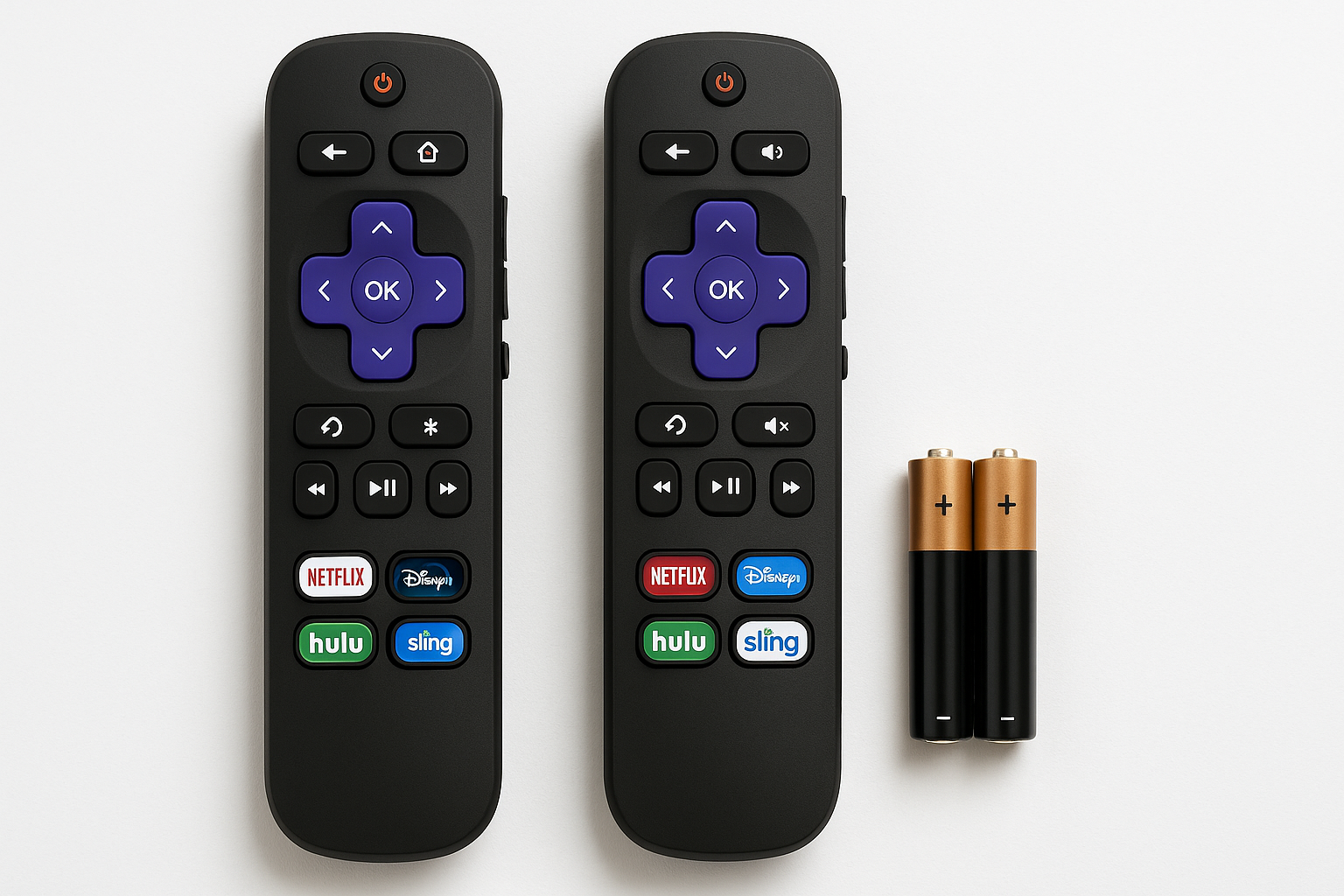
The (Pack of 2) Replacement Remote Control Only for Roku TV (B09Z6Q2MLC) is aimed at Roku TV owners who want a straightforward, no‑setup replacement for a lost or failing remote. Instead of Wi‑Fi or Bluetooth pairing, these units use infrared (IR), similar to many OEM Roku TV remotes, meaning they work by pointing directly at the TV’s IR sensor.
The pack is marketed as compatible with a wide range of Roku TV brands, including:
- TCL Roku TV
- Hisense Roku TV
- Onn Roku TV
- Sharp Roku TV
- Element Roku TV
- Westinghouse Roku TV
- Philips Roku Smart TV
Equally important is what it does not support. According to the product documentation and packaging, these remotes are:
- Not for Roku Stick (Roku Streaming Stick models)
- Not for Roku Box / Player / Ultra / Express / Premiere
For households with one or more Roku TVs that rely on simple IR remotes, this 2‑pack offers a low‑effort way to get back to watching without navigating pairing menus or app‑based workarounds. If the price is a consideration, this set typically targets the budget segment and is often more affordable than many brand‑name voice remotes, with the current price around $8.97 on Amazon.
Feature Breakdown
1. Infrared (IR) Control Only
These remotes rely solely on IR signals rather than Wi‑Fi or Bluetooth. Practical implications:
- You must have line of sight between the remote and the TV’s IR receiver.
- There is no pairing button and no on‑screen pairing process.
- The remote functions as a straightforward drop‑in replacement for many Roku TVs that originally shipped with an IR remote.
The manufacturer’s user information for the B09Z6Q2MLC model explicitly notes that there is no voice button, no headphone jack, no pairing button, and no internal battery, underscoring the simple, IR‑only nature of this product.
2. Roku TV‑Focused Button Layout
The layout is familiar to Roku TV users and typically includes:
- Power button for the TV
- Directional pad (up, down, left, right) with OK/Select in the center
- Home and Back buttons
- Volume up/down and Mute (these control the TV’s built‑in audio)
- Playback controls (Play/Pause, Fast Forward, Rewind)
- A small set of shortcut keys for popular streaming services (these vary by batch and region)
The layout closely mirrors many original Roku TV remotes, minimizing the learning curve for anyone already familiar with Roku’s interface.
3. Broad Roku TV Compatibility
The product is designed for Roku TVs only, not Roku streaming players. That distinction matters because Roku TVs use IR codes tailored for television sets, while many sticks and boxes use Wi‑Fi or different IR mappings.
Intended compatibility includes, but is not limited to:
- TCL Roku TV models
- Hisense Roku TV models
- Onn Roku TV (commonly sold through big‑box retailers)
- Sharp Roku TV models
- Element Roku TV models
- Westinghouse Roku TV models
- Philips Roku Smart TVs built on Roku OS
In practice, most users simply insert batteries, point the remote at the TV, and begin using it without any additional steps, assuming the TV is a Roku‑based model from the listed brands.
4. Pack of 2 for Redundancy
The inclusion of two identical remotes is a practical design choice:
- You can keep a spare in another room or drawer.
- In multi‑TV households, both remotes can work interchangeably with compatible Roku TVs.
- If one is lost or damaged, you don’t immediately lose control of your TV.
For the cost of a single mid‑range smart remote, you get two simple replacements, which is part of the appeal at around $8.97 for the 2‑pack.
Performance Insights
Responsiveness and Reliability
In typical use, IR remotes are responsive as long as:
- The batteries are fresh.
- There is a clear line of sight to the TV’s IR receiver.
- You are within a normal living room distance (often up to 20–25 feet, though this can vary by environment and TV).
Because these units rely on the well‑established IR protocol for Roku TVs, button presses are usually registered immediately, with no waiting for a wireless reconnection after sleep (a common complaint with some Wi‑Fi or Bluetooth remotes).
No Pairing Quirks
Since the B09Z6Q2MLC remotes don’t use wireless pairing, you avoid issues like:
- Remotes that lose pairing after power outages
- Complicated steps such as pressing and holding a pairing button near the batteries
- Needing to connect the TV to Wi‑Fi first before a voice remote can be registered
For many households, especially where reliability and simplicity are more important than advanced features, this is a major advantage.
Limitations vs. Official Roku Voice Remotes
Compared with official Roku Voice or Voice Remote Pro options, this 2‑pack lacks:
- Voice search and commands
- Headphone jack for private listening
- Rechargeable batteries or advanced power features
- Enhanced TV control features beyond core functions (for example, no CEC‑style controls for external soundbars via the remote itself)
If you rely heavily on voice search or like the convenience of private listening through a remote, this product is intentionally minimalistic and may feel like a downgrade from premium Roku accessories.
Usability
Setup Process
For a compatible Roku TV, the setup process is about as simple as it gets:
- Insert batteries (AA or AAA, depending on the batch; batteries are usually not included).
- Point the remote at your Roku TV.
- Press Power or Home.
If your TV is supported, it should respond immediately. There’s no Wi‑Fi configuration, no app to download, and no additional pairing instructions.
Everyday Operation
Day‑to‑day usage mirrors an OEM Roku TV remote:
- Navigation: The directional pad and OK button make it easy to move through the Roku home screen, app rows, and settings.
- Volume and mute: Direct control of the TV speakers from the remote without secondary remotes.
- Shortcuts: App shortcut keys can save a few clicks, though which apps are printed on them is fixed and cannot be changed.
Even users who are not tech‑savvy (children, older adults, guests) can usually operate the remote without guidance, provided they already understand basic TV controls.
Build Quality and Ergonomics
While this is a budget‑oriented product, the housing tends to follow the classic Roku remote style:
- Compact, lightweight body that sits comfortably in one hand
- Rubberized or soft‑touch buttons with clear labeling
- Distinct shape and texture differences between key buttons (Home, OK, Back), making them easier to find by feel
It is not built to premium standards, but for everyday use—channel surfing, app navigation, and casual streaming—the construction is generally adequate.
Trade-offs
Strengths
- Very simple to set up – insert batteries and use, with no pairing required on most compatible Roku TVs.
- Broad Roku TV compatibility across several brands (TCL, Hisense, Onn, Sharp, Element, Westinghouse, Philips).
- Two remotes in one package, offering a built‑in spare or multi‑room flexibility.
- IR reliability for TVs that already expect IR input, with no Wi‑Fi or Bluetooth handshake delays.
- Typically budget‑friendly, especially considering you receive two units for around $8.97.
Limitations
- Not compatible with Roku Streaming Stick, Roku Box, Roku Ultra, Express, Premiere, or other dedicated Roku players.
- No advanced features such as voice search, headphone jack, or rechargeable battery.
- IR requires line of sight; it will not work through cabinets or from behind obstacles.
- Exact shortcut app buttons are fixed and cannot be remapped, which might reduce usefulness if you don’t use the printed services.
- Build quality is functional rather than premium; heavy or rough use may shorten lifespan compared with higher‑end official remotes.
When It’s Not the Right Choice
You might want to skip this product if:
- Your primary Roku device is a Roku Streaming Stick or box rather than a Roku TV.
- You strongly prefer voice control, private listening via headphone jack, or other advanced remote features.
- Your setup requires the remote to work without pointing at the TV, such as when devices are hidden or wall‑mounted with limited IR visibility.
In those cases, an official Roku Voice Remote or similar Wi‑Fi/Bluetooth remote designed specifically for your player or TV would be more appropriate.
Conclusion
The (Pack of 2) Replacement Remote Control Only for Roku TV (B09Z6Q2MLC) targets a specific, practical need: simple, reliable, and inexpensive control for Roku TVs that expect an IR remote. It delivers familiar Roku button layout, straightforward plug‑and‑play operation, and wide Roku TV brand compatibility, all while providing two remotes in one package at around $8.97.
You give up premium extras—voice search, headphone jack, rechargeable battery, or universal control—but in return you get a low‑friction solution that often just works out of the box. For households with TCL, Hisense, Onn, Sharp, Element, Westinghouse, or Philips Roku TVs where the original remote is missing, damaged, or unreliable, this 2‑pack is a practical replacement or backup option, as long as you understand that it is only for Roku TVs and not for Roku streaming sticks or boxes.