

KODAK Dock Plus 4x6 Photo Printer Review: Convenient Dye-Sub Printing From Your Smartphone
Product Context
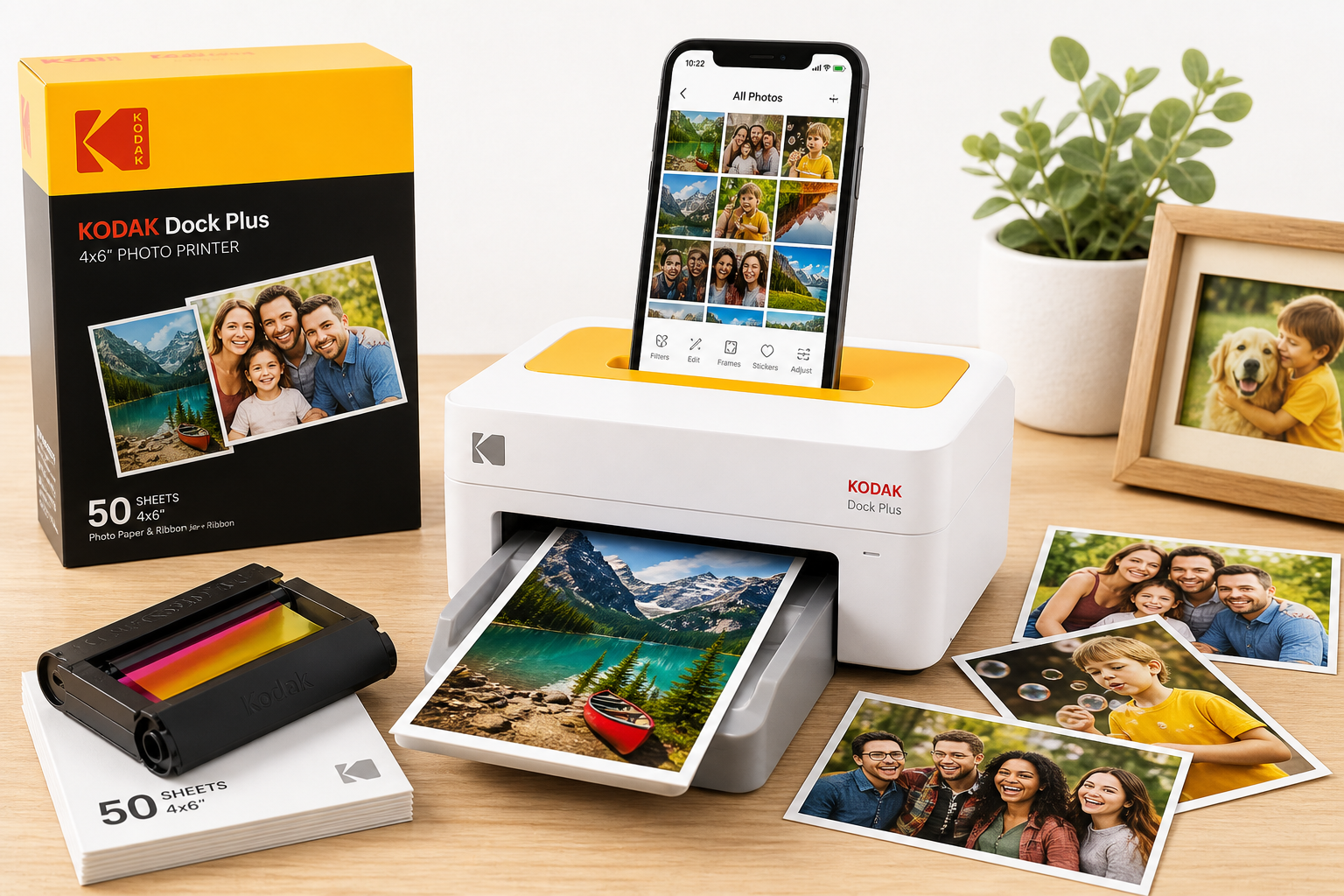
The KODAK Dock Plus 4x6 Photo Printer is a compact, desktop-style photo printer aimed at users who primarily shoot with their smartphones but still want physical 4x6-inch prints. Instead of a full-size inkjet or a tiny 2x3 pocket printer, the Dock Plus sits in the middle: it focuses on standard postcard-sized photos, uses dye-sublimation (4PASS) technology, and is designed for quick prints from iOS and Android devices via docking or Bluetooth.
This particular configuration comes with 50 sheets of paper in the box, so you can start printing immediately, rather than needing to buy media separately. While retail pricing fluctuates, the Dock Plus typically sits in the mid-range among consumer instant photo printers, and you should treat a street price around $119.99 as a reference point when evaluating value.
Who it’s for
- Smartphone photographers who want lab-style 4x6 prints at home.
- Families who print event photos, school memories, and holiday snapshots.
- Scrapbookers and journalers who prefer standard-size prints over tiny sticker-style photos.
- Users who value durability (water-, fingerprint-, and fade-resistant output) more than ultra-low per-print cost or all-in-one office features.
It is not aimed at office document printing or large-format work; it’s a dedicated photo printer with a very specific 4x6-inch use case.
Feature Breakdown
4PASS Dye-Sublimation Printing
The Dock Plus uses Kodak’s 4PASS dye-sublimation process, which lays down color in four passes (typically yellow, magenta, cyan, and a clear overcoat). Compared with ZINK (zero-ink) systems, this approach generally offers:
- Smoother gradients and more accurate skin tones.
- A protective laminate layer that helps resist water, fingerprints, and fading.
- Consistent output from the first to the last print, since color comes from a ribbon rather than embedded crystals in the paper.
The trade-off is that the printer must shuttle each sheet in and out multiple times during a print job, which affects speed and may increase mechanical noise.
4x6" Standard Photo Size
Unlike mini printers that output 2x3" or smaller prints, the Dock Plus focuses on full-size 4x6" photos, the standard size used in most frames and albums. This makes it better suited for:
- Framed photos around the home.
- Photo gifts and postcards (with manual writing on the back).
- Traditional photo albums and scrapbooks that expect 4x6 prints.
Smartphone Docking and Bluetooth
The headline feature is the smartphone dock built into the top of the unit. On compatible phones, you can place the device directly on the dock to:
- Establish a direct connection for printing.
- Charge the phone while printing.
For broader compatibility, the printer also supports Bluetooth printing via the Kodak Photo Printer app, which works with both iOS and Android devices. This is the more universal method and is what most users will rely on over time, especially as phone connector standards evolve.
Kodak Photo Printer App
Kodak’s companion app is central to the experience:
- Available on iPhone and Android.
- Lets you select images from the camera roll or social platforms.
- Includes filters, frames, stickers, and basic adjustments (brightness, contrast, cropping, aspect ratio).
- Supports borderless or bordered prints and simple collage layouts.
The app-centric approach means the hardware itself is quite minimal: there’s no display or complex on-device menu system. Most functionality lives in software.
Included Media: 50 Sheets
This bundle includes 50 sheets of 4x6 photo paper plus the corresponding ribbon cartridge. Because dye-sublimation media is usually sold in matched sets (paper + ribbon for a fixed number of prints), calculating running costs is relatively straightforward:
- Each bundle is rated for a fixed number of prints.
- Cost-per-print depends on the street price of those bundles.
When comparing overall ownership cost, you’ll want to factor in the cost of additional media kits on top of the initial purchase price of about $119.99.
Performance Insights
Print Quality
For its class, the Dock Plus delivers solid photographic output:
- Color reproduction is generally vibrant, with good saturation suitable for family snapshots and social content.
- Skin tones are typically more natural than what you’d get from many ZINK-based mini printers, though not at the level of a high-end desktop photo inkjet.
- The laminated surface gives prints a glossy, finished look with added durability.
Fine detail is usually sufficient for everyday photos. Side-by-side with lab prints, you may notice slightly less subtle tonality in shadows and a bit more contrast, but the overall look is close enough for casual and home use.
Durability
One of the strongest selling points is durability. The 4PASS process finishes with a clear overcoat layer, which yields prints that are:
- Water-resistant – a splash or fingerprint smudge is unlikely to ruin a photo immediately.
- Fingerprint-resistant – the glossy coating helps reduce visible smudging.
- Fade-resistant – more resilient to light exposure than many low-cost inkjet prints when displayed under typical home conditions.
These characteristics make the Dock Plus well suited to prints that will be handled often, placed on the fridge, or shared in albums and scrapbooks.
Speed and Throughput
Because each print requires four passes, print speed is modest but acceptable for a device of this type:
- Expect roughly under a minute per 4x6 print once the printer is warmed up.
- The paper shuttles in and out of the printer multiple times, which adds a bit of mechanical noise during operation.
For printing a handful of photos from a party or trip, the throughput is adequate. It’s not ideal if you routinely need dozens of prints at once—at that point, an online photo lab or higher-volume printer might be more efficient.
Connectivity Reliability
In typical use, once the printer is paired, Bluetooth connections are generally stable, but a few practical considerations apply:
- Initial pairing may take a bit longer the first time; it’s best done near the printer, with other Bluetooth devices disabled or kept at a distance if you encounter interference.
- The physical dock can be more reliable than wireless in congested environments, but its usefulness depends heavily on whether your phone’s connector aligns with the dock design and whether you have a case installed.
Firmware and app updates can improve stability over time, so it’s worth checking for updates when you first set up the device.
Usability
Setup and Installation
For most users, setup is straightforward:
- Unbox the printer and remove packaging materials.
- Install the ink ribbon cartridge.
- Load the 4x6 paper into the tray.
- Download the Kodak Photo Printer app from the App Store or Google Play.
- Power on the printer and pair via Bluetooth or dock a compatible phone.
The app guides you through much of the process and provides status messages if paper or ribbon is not correctly installed.
Everyday Use
In day-to-day operation, the workflow is simple:
- Launch the app, choose the printer, and select images.
- Make any desired edits or add borders/frames.
- Tap print and wait for the printer to complete the four-pass cycle.
The lack of an onboard screen keeps the hardware minimal, but some users may miss being able to trigger reprints or basic maintenance functions directly from the printer. Most adjustments (including borders and color tweaks) must be done in the app.
Physical Design and Footprint
The Dock Plus has a compact rectangular footprint that fits easily on a shelf, side table, or desk. Key design points:
- Paper handling is via a small tray that attaches to the front.
- The phone dock is on top, with a relatively flat surface when not in use.
- There are minimal physical controls, typically limited to power and status indicators.
Cable management is simple—just a power cord—but you’ll want to leave enough clearance for the paper to move in and out during printing.
Trade-offs
No compact photo printer is perfect. The Dock Plus brings a set of compromises worth considering.
Strengths
- Good photo durability thanks to 4PASS dye-sublimation with a laminated finish.
- Standard 4x6" output suitable for frames, albums, and gifts.
- Phone docking plus Bluetooth for flexible connectivity.
- Integrated charging while printing when using the dock with compatible phones.
- A relatively generous 50-sheet starter pack, so you can evaluate the system before committing to more media.
Limitations
- Single print size (4x6 only); no native support for smaller sizes or stickers without manual trimming.
- Print speed is moderate; fine for batches of a few photos, less ideal for large print runs.
- Long-term connector compatibility for the dock may be affected as phone ports change, making Bluetooth the more future-proof option.
- Ongoing media cost is higher per print than sending large batches to an online photo lab, even when the printer itself is priced around $119.99.
- As with any compact printer, mechanical reliability depends on correct paper handling and keeping dust out of the paper path; occasional misfeeds can happen if the tray is bumped or overloaded.
Comparisons to Alternatives
- Versus 2x3 ZINK mini printers, the Dock Plus generally offers better color fidelity and longevity, but is larger and less pocketable, with higher upfront cost.
- Versus desktop inkjet printers, it is simpler and more predictable for photo-specific use, but lacks flexibility for documents and different sizes.
- Versus sending images to a photo lab, the Dock Plus trades lower per-print cost for instant gratification and control at home.
Conclusion
The KODAK Dock Plus 4x6 Photo Printer is a capable, focused solution for anyone who wants to turn smartphone images into physical, lab-style 4x6 prints at home. Its 4PASS dye-sublimation technology delivers durable, glossy photos with good color, and the combination of smartphone docking and Bluetooth connectivity makes it accessible for most iOS and Android users.
It is best suited to families, casual photographers, and scrapbookers who value convenience and durability over absolute per-print economy. If you frequently print in small batches and like the idea of on-demand, tactile photos, the Dock Plus offers a balanced mix of quality, ease of use, and standard 4x6 output at a typical street price near $119.99.
For users who mainly need office documents, large-format printing, or professional-level color control, a different class of printer will be more appropriate. But within the niche of compact, consumer 4x6 photo printers, the KODAK Dock Plus remains a practical and enjoyable way to bring your smartphone memories into the physical world.