

Apple iPad 11‑inch (A16, 128GB, Wi‑Fi, Pink) Review: The New Default iPad for Everyday Use
What This Product Is
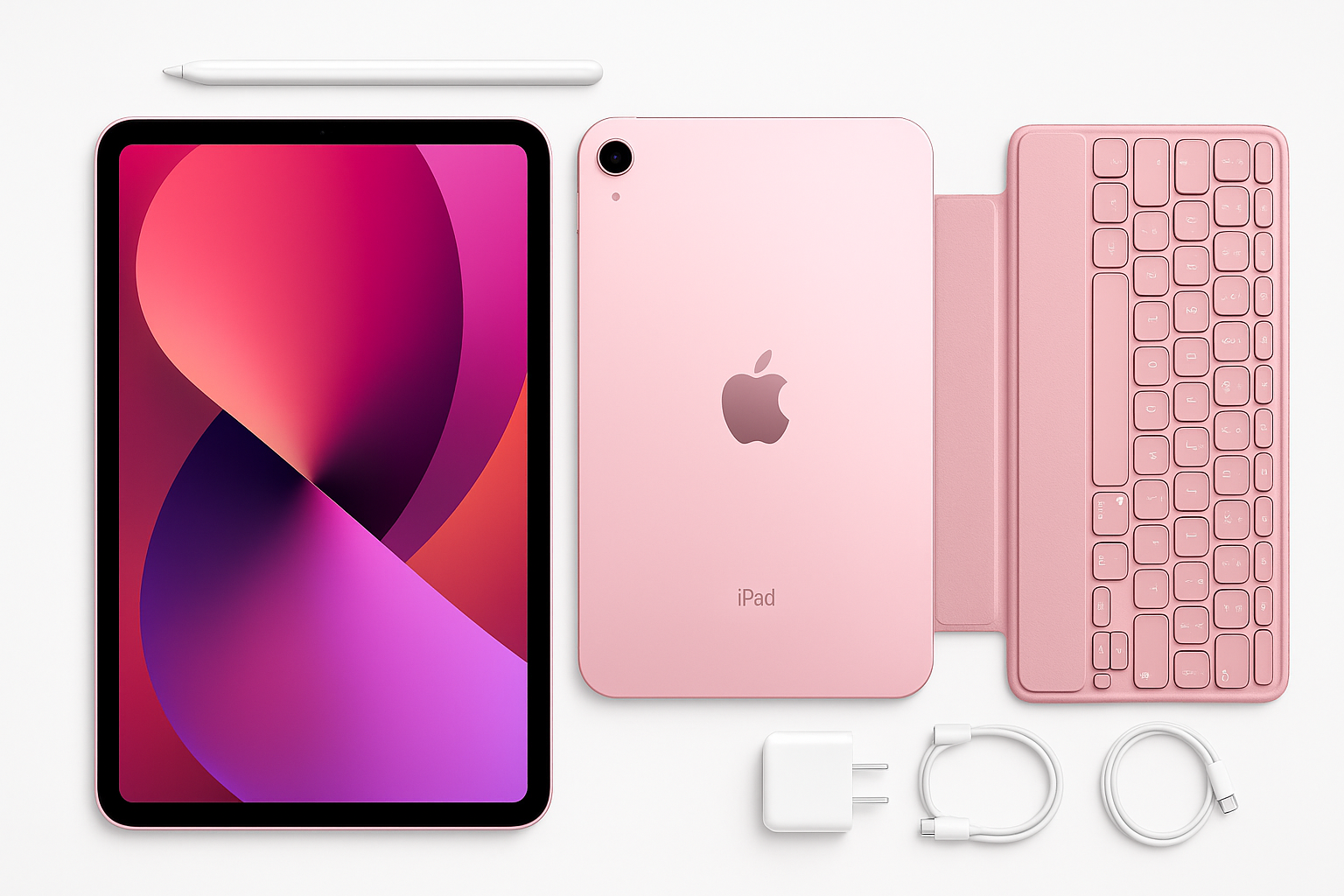
The Apple iPad 11‑inch: A16 chip, 128GB, Wi‑Fi 6, Pink is Apple’s latest standard iPad, often referred to as the 11th‑generation model. It sits between the more affordable 10th‑gen iPad and the higher‑end iPad Air and iPad Pro lines.
Key hardware highlights include:
- Chip: Apple A16, bringing a noticeable step up in CPU, GPU, and Neural Engine performance compared with earlier base iPads.
- Display: 11‑inch Liquid Retina LED‑backlit IPS panel with 2360×1640 resolution at 264 ppi and up to 500 nits brightness.
- Storage: 128GB in this configuration, which is now the starting capacity for this generation.
- Connectivity: Wi‑Fi 6 (802.11ax) and Bluetooth 5.3 for fast wireless performance.
- Cameras: 12MP front camera (supporting Center Stage) and 12MP rear camera for everyday photos, video, and scans.
- Security & Input: Touch ID integrated into the top button, support for Apple Pencil (USB‑C and 1st gen via adapter) and compatible keyboards.
- Battery: Rated for all‑day use with up to around 10 hours of typical web or video use on Wi‑Fi.
- Design: Slim aluminum chassis with flat sides, USB‑C port, and a pink finish alongside other color options.
This specific model is Wi‑Fi only (no cellular) and 128GB, finished in Pink, making it the entry‑level configuration of the new 11‑inch iPad line.
If you’re purchasing from Amazon, expect pricing around $399.99 for this configuration, depending on sales and third‑party sellers.
Why It Matters
The 11‑inch A16 iPad is important because it effectively becomes the default iPad for most people:
- The prior base models were increasingly limited by older chips and smaller storage tiers.
- iPad Air and iPad Pro models are powerful but significantly more expensive and aimed at heavier workloads.
By moving to the A16 chip and standardizing on 128GB as the base storage, Apple has made its mainstream iPad more capable and more future‑proof for typical users who browse, stream, read, and use a mix of productivity and creative apps.
For students, casual users, and many professionals who want a companion device rather than a full laptop replacement, this model offers enough performance and storage to last several years, while staying below the price and complexity of the Pro lineup.
Key Advantages
1. Strong Everyday Performance from the A16
The A16 chip is a real upgrade over earlier base iPad processors. In everyday use, this translates into:
- Smooth multitasking with multiple apps in Split View or Slide Over.
- Fast app launches and responsive web browsing.
- Headroom for heavier apps like advanced note‑taking tools, image editing, or casual gaming.
While it does not match the raw power of Apple’s latest M‑series chips, it is more than adequate for typical iPad workloads and should keep the device usable through several rounds of iPadOS updates.
2. 11‑Inch Liquid Retina Display
The 11‑inch Liquid Retina display hits a practical sweet spot between portability and usability:
- Resolution and sharpness are excellent for reading, browsing, and watching video.
- Color and brightness are solid, with up to 500 nits and support for True Tone, making it comfortable in a variety of lighting environments.
- The extra screen real estate over 10.2‑inch or 10.9‑inch models gives Split View multitasking more breathing room, which is especially useful for students and note‑takers.
It remains a 60 Hz panel, not the 120 Hz ProMotion display found on the iPad Pro. For most users this is perfectly acceptable, though high‑frame‑rate enthusiasts and artists who rely heavily on ultra‑smooth Pencil input may notice the difference.
3. 128GB Base Storage
Earlier entry iPads often started at 64GB, which could feel cramped once you installed several large apps, downloaded offline videos, or stored a photo library.
With 128GB as standard on this model:
- There is more room for apps, games, and media.
- You can comfortably store offline files for travel or study.
- Many users can avoid the cost of moving to higher storage tiers.
Heavy local‑storage users (for large game libraries, extensive 4K video projects, or huge raw photo collections) may still want more, but 128GB is a much more forgiving baseline than before.
4. Capable Cameras and Center Stage
The 12MP front camera with Center Stage is particularly useful for modern workflows:
- It keeps you framed in the shot during video calls.
- It works well in common apps like FaceTime, Zoom, and Teams.
The 12MP rear camera is sufficient for document scanning, occasional photos, and video clips. It’s not a replacement for a good smartphone camera, but as a tablet camera it’s well above basic.
5. Solid Battery Life and Charging via USB‑C
This iPad maintains Apple’s familiar “all‑day” battery target. In normal use (web browsing, email, streaming, light gaming), most users can comfortably get through a full day on a single charge.
USB‑C charging simplifies life if you already own a modern laptop or Android/USB‑C accessories, and it opens the door to a wide ecosystem of hubs, docks, and external displays.
6. Design, Build, and Color Options
The chassis follows Apple’s recent design language:
- Flat edges, minimal bezels, and a sturdy aluminum shell.
- Touch ID in the power button, leaving the screen uncluttered.
- A lightweight profile that’s comfortable to hold for reading or watching video.
The pink finish adds a more personal, playful option versus traditional silver or space gray. If you like colorful tech, this is an appeal point on its own.
Key Limitations
1. 60 Hz Display (No ProMotion)
For most people, a 60 Hz panel is fine, but there are trade‑offs:
- Animations, scrolling, and Apple Pencil strokes feel less fluid than on 120 Hz Pro models.
- If you’ve already used a ProMotion display extensively, the difference is noticeable.
For digital artists and those highly sensitive to display smoothness, this may be a reason to consider an iPad Air or Pro instead.
2. No Face ID
This iPad continues to rely on Touch ID in the power button rather than Face ID:
- Touch ID is generally reliable and fast, but unlocking requires a deliberate press.
- If you’ve grown accustomed to hands‑free Face ID on an iPhone or iPad Pro, this may feel like a step back.
For many users, this is a minor issue; but at this price level and given Apple’s broader lineup, some may wish for Face ID.
3. Wi‑Fi Only (No Cellular in This Configuration)
The specific model linked is Wi‑Fi only. While that keeps cost down, it has implications:
- You’ll need a phone hotspot or local Wi‑Fi on the go.
- Frequent travelers or field workers may prefer a Wi‑Fi + Cellular configuration, even at a higher cost.
If constant connectivity is critical, you’ll want to compare this model against its cellular sibling or higher‑tier iPads.
4. Not as Future‑Proof as M‑Series iPads for Heavy Workloads
The A16 is powerful for a base iPad, but it is not an M‑series chip:
- Pro‑level tasks like complex video editing, 3D work, or running heavy creative suites are still better suited to iPad Air or Pro models with M‑series silicon.
- iPadOS features that lean into higher RAM and GPU performance will always favor the M‑series devices.
If you’re already pushing the limits of older iPads with professional workloads, this model may feel like a lateral move rather than a true upgrade.
5. Accessories Add to the Total Spend
The iPad experience is heavily influenced by accessories:
- Apple Pencil (USB‑C or 1st gen via adapter) adds drawing, markup, and handwriting capability.
- A keyboard case turns the device into a light laptop alternative.
Both come at additional cost, and official Apple accessories are not inexpensive. When budgeting, remember that the real‑world cost of a “complete” setup will exceed $399.99 once you factor in Pencil, keyboard, and a case.
Who It’s For
This configuration of the iPad 11‑inch is best suited for:
-
Students and Learners
- Ideal for note‑taking (especially with Apple Pencil), reading textbooks and PDFs, attending video classes, and light research.
- 128GB strikes a good balance between room for course materials and overall cost.
-
Casual Home Users
- Great for web browsing, email, social media, streaming video, casual games, and managing smart‑home apps.
- The pink color makes it an appealing personal device or gift.
-
Light Productivity and Remote Work
- Paired with a keyboard case, it handles email, document editing, presentations, and video calls smoothly.
- Wi‑Fi 6 provides robust connectivity in modern home and office networks.
-
Creative Hobbyists
- Suitable for sketching, digital journaling, basic photo editing, and audio apps.
- Apple Pencil support plus the 11‑inch display offers a comfortable canvas for non‑pro creators.
-
Families and Shared Household Devices
- The combination of performance, battery life, and screen size makes it a strong choice for a shared living‑room or kitchen tablet.
Who Should Skip It
You may want to skip this iPad and look at other models if:
-
You Need Pro‑Level Performance or Features
- If you regularly do 4K video editing, heavy 3D work, or rely on large pro creative suites, an iPad Air or iPad Pro with an M‑series chip will serve you better.
- Artists who want the smoothest Pencil experience may prefer a 120 Hz ProMotion display.
-
You Require Always‑On Cellular Connectivity
- Field workers, frequent travelers, or people who don’t want to rely on hotspots should consider a Wi‑Fi + Cellular version instead of this Wi‑Fi‑only model.
-
Budget Is Extremely Tight
- If you just need something for basic browsing and streaming and want to minimize cost, a discounted older‑generation iPad or a refurbished model could be more appropriate.
-
You Want a Laptop Replacement First and Tablet Second
- While this iPad can handle light productivity, it is still optimized as a tablet.
- Users who expect full desktop‑class workflows, multiple external displays, or heavy multitasking may be better served by a MacBook or similar laptop.
-
You Strongly Prefer Face ID
- If you find Touch ID inconvenient and are used to Face ID on other Apple devices, the lack of facial recognition unlocking may be a deal‑breaker, pushing you toward the iPad Pro.
Final Recommendation
The Apple iPad 11‑inch (A16, 128GB, Wi‑Fi, Pink) is an excellent all‑round tablet and a strong default choice for most users who want a capable, long‑lasting iPad without stepping up to the Air or Pro lines.
Its strengths are clear: a modern A16 chip, a sharp 11‑inch Liquid Retina display, 128GB of base storage, a solid camera setup, and all‑day battery life, wrapped in a light, colorful chassis. The main trade‑offs—60 Hz display, no Face ID, Wi‑Fi only in this configuration, and non‑M‑series silicon—are acceptable or irrelevant for the majority of everyday users.
If your primary needs are media consumption, studying, note‑taking, light productivity, and casual creativity, this 128GB Wi‑Fi model in pink offers a compelling balance of performance, features, and design at around $399.99 on Amazon, with the understanding that adding accessories will raise the total investment.
For power users and professionals pushing the limits of what a tablet can do, the iPad Air or Pro remain better long‑term tools. But for everyone else, this 11‑inch A16 iPad is a practical, modern, and enjoyable device that should serve well for years.