

Apple 2026 MacBook Air 15‑inch (M5, 16GB/512GB, Sky Blue) Review: A Bigger Air Built for Everyday AI
Quick Summary
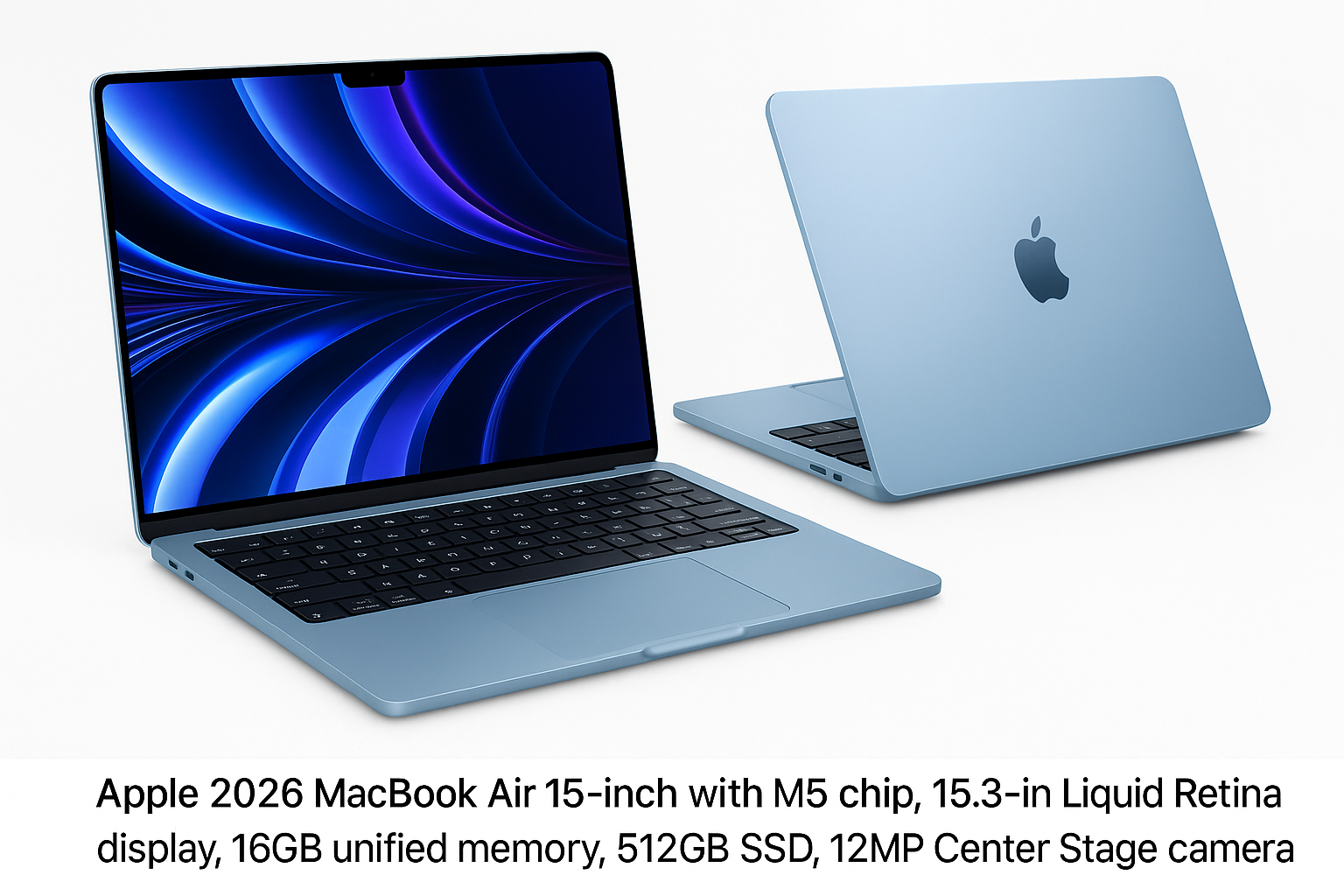
The Apple 2026 MacBook Air 15‑inch with M5 chip expands the Air line for users who want more screen real estate without stepping up to a MacBook Pro. With a 15.3‑inch Liquid Retina display, 16GB of unified memory, 512GB SSD, a 12MP Center Stage camera, Touch ID, and Wi‑Fi 7, it is positioned as a thin‑and‑light everyday machine that can lean on Apple’s newest AI‑focused silicon.
If you prioritize:
- a larger, sharp, color‑accurate display in a relatively light chassis,
- quiet, fanless or near‑silent operation,
- and an OS that’s increasingly integrating on‑device AI features,
the 15‑inch Air is designed to be a strong option. The main trade‑offs are limited ports, non‑upgradeable internals, and performance ceilings for sustained heavy workloads compared to MacBook Pro models.
For current pricing, expect Apple’s typical mid‑range MacBook positioning; the configuration reviewed here is available around $1399.00 on Amazon.
Detailed Analysis
Design and Build
The 2026 15‑inch MacBook Air continues Apple’s flat‑edged, minimalist aesthetic introduced in earlier generations, scaled up to house the 15.3‑inch panel. The Sky Blue finish adds a more playful option to the usual neutral tones, while maintaining the same unibody aluminum stiffness and premium feel associated with the Air line.
Key design traits:
- Thin and light for a 15‑inch: it’s noticeably slimmer and lighter than most 15‑inch Windows ultrabooks, making it realistic to carry daily in a backpack or tote.
- Excellent fit and finish: little to no flex in the deck or lid, tight tolerances, and a smooth hinge that can be opened one‑handed.
- Familiar layout: full‑size Magic Keyboard with function row, large glass trackpad, Touch ID integrated into the power button.
Color‑matched detailing and the larger footprint give it a more substantial desk presence than the 13‑inch Air, but it still feels closer to an ultraportable than a desktop replacement.
Display: 15.3‑inch Liquid Retina
The 15.3‑inch Liquid Retina display is one of the main reasons to choose this model. You get:
- High pixel density for sharp text and UI elements.
- Wide color gamut support (P3‑class coverage on recent Apple displays) suitable for light photo and video work.
- Strong brightness levels for indoor use and acceptable visibility outdoors in shade.
Compared to the smaller Air:
- More horizontal and vertical space for multitasking.
- Less frequent app window shuffling—two documents side‑by‑side or a full‑width timeline in a video editor feel more comfortable.
It doesn’t reach the HDR and ProMotion (high refresh rate) capabilities of MacBook Pro’s mini‑LED displays, but for its class it’s well above average, especially for productivity and media consumption.
M5 Chip and "Built for AI" Positioning
Apple’s M5 chip continues the trend of combining CPU, GPU, and Neural Engine in a single SoC with unified memory. While exact core counts vary by SKU, you can reasonably expect:
- Strong single‑core performance for snappy app launches and UI responsiveness.
- Efficient multi‑core performance that handles office work, coding, and light creative tasks without fans ramping up loudly.
- A more capable Neural Engine for on‑device AI tasks (speech processing, image enhancements, local generative features where supported by macOS and apps).
For typical workloads—browser with many tabs, office apps, Slack/Teams, light photo editing, and some code compilation—the 15‑inch Air feels consistently responsive. It’s also well‑suited to AI‑assisted productivity features (transcription, background blur, smart photo tools) as macOS and third‑party apps lean more heavily on Apple’s Neural Engine.
However, compared to Pro‑class Macs:
- Sustained export of large 4K/8K projects, heavy 3D rendering, or running multiple high‑end VMs will hit thermal and power limits sooner.
- GPU‑intensive tasks are fine for light creator workloads but not intended to replace a workstation‑class MacBook Pro.
Memory and Storage: 16GB Unified, 512GB SSD
The configuration here includes 16GB of unified memory and a 512GB SSD, which is currently the sweet spot for many users:
- 16GB unified memory provides enough headroom for serious multitasking and most creative apps without frequent swapping to disk.
- 512GB SSD is adequate for office files, code, moderate photo libraries, and a handful of heavy apps. Users with large video or RAW photo archives will still want external storage.
Important limitation: memory and storage are not upgradeable after purchase. You should plan capacity carefully at the time of order.
Camera, Audio, and Input
- 12MP Center Stage camera: A step up from legacy 720p and 1080p webcams, with higher resolution and support for Center Stage framing in compatible apps. It produces cleaner, sharper video in good light and holds up better under average home/office lighting.
- Microphones: Apple typically includes a high‑quality triple‑mic array with directional beamforming. This is more than sufficient for calls, meetings, and voice dictation without an external mic.
- Speakers: The 15‑inch chassis allows for larger speaker chambers than on smaller Airs, giving fuller sound and stronger stereo separation. It’s capable of comfortably filling a small room with podcasts or music and offers clear dialog for movies.
- Keyboard and trackpad: The Magic Keyboard has stable scissor switches, good travel for an ultrabook, and even backlighting. The Force Touch trackpad remains among the best in the industry for precision and gesture support.
Connectivity and Ports
The 2026 MacBook Air 15‑inch includes modern wireless and a minimal but usable port selection:
- Wi‑Fi 7: Brings higher theoretical throughput, lower latency, and better performance in congested environments when paired with compatible routers. It also helps future‑proof the machine for multi‑gigabit home/office networks.
- Bluetooth (latest standard in the series) for AirPods, mice, keyboards, and other peripherals.
- Likely two USB‑C / Thunderbolt ports and a MagSafe charging port, plus a 3.5mm headphone jack—a typical layout for recent Air models.
The limited number of USB‑C ports means many users will still rely on a hub or dock for multi‑monitor setups or multiple peripherals.
User Experience
Everyday Productivity
For everyday tasks, the 15‑inch Air feels fast and unobtrusive:
- Apps launch quickly, and switching between browser tabs, email, office apps, and messaging is fluid.
- The larger screen makes multitasking more comfortable than on 13‑inch laptops; you can keep reference material, a document, and chat windows visible simultaneously.
- Battery life (based on typical M‑series Air behavior) should comfortably cover a full work or school day of web, documents, and video calls for most users.
AI‑Accelerated Workflows
The "Built for AI" branding reflects how macOS and associated apps are evolving:
- On‑device transcription and translation, background noise reduction, and smart camera framing for video calls.
- Photo and video tools that use local machine learning for object detection, auto‑enhancement, and selection.
- Potential support for local generative features (summary, rewrite, basic image generation) that leverage the Neural Engine rather than fully offloading to the cloud.
These features are mostly invisible until you start to rely on them, but collectively they contribute to a smoother, more capable day‑to‑day experience.
Media and Light Creative Work
The combination of the 15.3‑inch display, good speakers, and efficient chip make this laptop comfortable for:
- Streaming video and casual gaming (primarily Apple Arcade and optimized titles).
- Photo editing in apps like Photos, Lightroom, or Pixelmator.
- Light video editing in Final Cut Pro or similar tools, especially for social media content.
For serious professional work in these areas, especially with large projects, you’ll still gain from the higher thermal envelope and more capable GPUs of MacBook Pro models—but the 15‑inch Air is more than capable for hobbyist levels and many semi‑pro workflows.
Portability and Thermals
Despite the larger screen, the Air remains easy to carry:
- It slips easily into most 15‑inch laptop sleeves and bags.
- The weight is manageable for commuting or campus use.
Thermally, Apple’s efficient silicon and macOS power management mean the chassis tends to stay comfortable, and fan noise (if present in this generation) is subtle during typical workloads.
Pros
- Large 15.3‑inch Liquid Retina display in a relatively light and thin chassis.
- M5 chip "built for AI" delivers strong everyday performance with enhanced on‑device AI capabilities.
- 16GB unified memory is well‑suited for serious multitasking and common creative workloads.
- 512GB SSD strikes a reasonable balance between capacity and cost for many users.
- 12MP Center Stage camera and high‑quality mics improve video call presence.
- Wi‑Fi 7 support for faster, more reliable wireless networking on modern routers.
- Premium build quality, excellent keyboard, and industry‑leading trackpad.
- Quiet operation and strong battery efficiency typical of Apple’s M‑series Air models.
Cons
- Limited ports likely mean frequent reliance on USB‑C hubs or docks for multi‑monitor or peripheral‑heavy setups.
- Non‑upgradeable memory and storage require choosing the right configuration at purchase.
- Display lacks ProMotion high refresh rate and HDR performance of MacBook Pro’s mini‑LED screens.
- GPU and sustained performance ceilings remain below MacBook Pro models for heavy professional workloads.
- Sky Blue is distinctive but may not appeal to users who prefer more muted or traditional finishes.
Value Assessment
Positioned between smaller MacBook Air models and the MacBook Pro line, the 15‑inch Air with M5, 16GB memory, and 512GB SSD targets users who:
- Want more screen space for productivity but don’t need Pro‑level sustained performance.
- Prefer a lighter, quieter laptop over a heavier machine with active cooling and higher peak performance.
- Intend to keep the device for several years and value Wi‑Fi 7 and AI‑oriented silicon as a form of future‑proofing.
At around $1399.00 on Amazon, it sits firmly in the premium ultraportable segment. In that context, it offers:
- Strong value for students, writers, office professionals, and light creators who can leverage the bigger screen daily.
- Less compelling value for users whose workloads clearly demand a MacBook Pro (e.g., full‑time video editors, 3D artists, or developers routinely running heavy local containers/VMs).
If you were already considering a smaller MacBook Air but often wish for more screen real estate, this 15‑inch configuration justifies the additional cost with tangible gains in comfort and usability.
Final Thoughts
The Apple 2026 MacBook Air 15‑inch with M5 chip successfully fills a long‑standing gap in Apple’s lineup: a truly thin‑and‑light MacBook with a large, comfortable display. It brings together a high‑quality 15.3‑inch screen, solid performance for everyday and light creative workloads, quietly integrated AI acceleration, and modern connectivity via Wi‑Fi 7.
Its limitations—non‑upgradeable internals, modest port selection, and performance headroom that still falls short of MacBook Pro territory—are worth considering, but they align with its identity as an Air: portable first, professional‑workstation second.
If your primary needs are productivity, study, everyday content creation, and you value portability and battery life as much as raw power, the 15‑inch Air in this 16GB/512GB Sky Blue configuration is an excellent, well‑balanced choice. For users whose workflows consistently push machines to their limits, however, it’s better seen as a capable companion or step‑down option rather than a full MacBook Pro replacement.