

Amazon Fire TV Stick 4K Plus Review: Faster Streaming, Smarter Search, Same Compact Stick
Overview
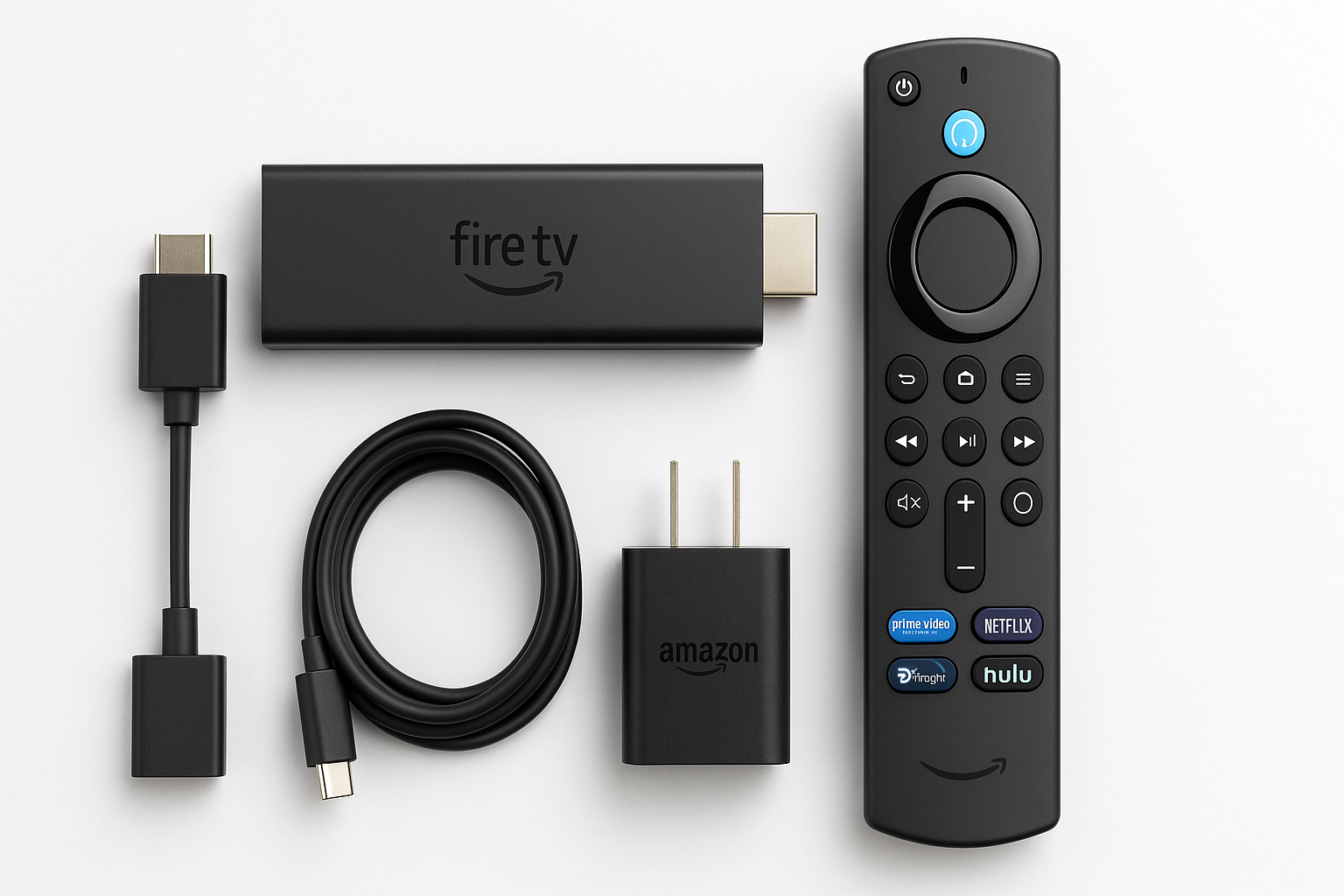
The Amazon Fire TV Stick 4K Plus (newest model) is a compact HDMI streaming stick that brings 4K Ultra HD, HDR (including Dolby Vision on supported TVs), and Dolby Atmos audio to almost any television. Building on previous Fire TV Stick 4K generations, this iteration adds AI-powered Fire TV Search and Wi‑Fi 6, aiming to deliver faster content discovery and smoother streaming in busy households.
Physically, it remains a small, unobtrusive stick that hides behind your TV and is powered via USB. The included Alexa Voice Remote controls both the Fire TV interface and basic TV functions like power and volume on compatible sets. Amazon positions this model as the mainstream 4K stick in its lineup: more capable than the entry-level HD and 4K Select options, but below the premium Fire TV Cube in raw power and I/O.
Key Highlights
- 4K Ultra HD streaming with support for HDR10, HDR10+, HLG, and Dolby Vision (TV‑dependent)
- Wi‑Fi 6 for more reliable streaming on congested home networks
- AI-powered Fire TV Search to surface relevant content more quickly via Alexa voice queries
- Alexa Voice Remote with TV control (power, volume, and input on many compatible TVs and soundbars)
- Access to hundreds of thousands of movies and shows, including major services like Prime Video, Netflix, Disney+, Hulu, Max, YouTube, and others
- Integrated free, ad-supported and live TV via Amazon Freevee, Pluto TV, Tubi, and Fire TV Channels
- Compact, travel‑friendly form factor that only requires HDMI and power
Core Features
1. Video and Audio Capabilities
The Fire TV Stick 4K Plus supports:
- Resolution: Up to 4K Ultra HD (2160p) at 60 fps
- HDR formats: HDR10, HDR10+, HLG, and Dolby Vision (when paired with a compatible TV)
- Audio: Dolby Atmos pass‑through for immersive sound with supported soundbars and AV receivers
In practice, this means compatible services (e.g., Prime Video, Netflix, Disney+) can stream in 4K HDR with rich color and high contrast, assuming your TV and subscription tier support it. SDR content is still upscaled effectively for 4K panels.
2. Performance and Hardware
Internally, this stick sits in the mid‑to‑upper range of Amazon’s Fire TV family. Compared to older Fire TV Stick 4K models, the 4K Plus benefits from a newer processor and optimizations that improve menu responsiveness and app load times. It’s not as powerful as the Fire TV Cube, but for typical streaming, navigation is generally smooth as long as storage isn’t jammed full of apps.
For most users, the device is sufficiently quick for:
- Launching streaming apps
- Switching between live channels and apps
- Navigating the Fire TV home screen and recommendations
Heavy multi‑taskers or those who frequently sideload and run many third‑party apps may still prefer the Cube, but for typical living‑room use, the 4K Plus’s performance is more than adequate.
3. Wi‑Fi 6 Connectivity
One of the more notable upgrades is Wi‑Fi 6 support. In real-world terms, you may see benefits if:
- Your router is Wi‑Fi 6‑capable
- Multiple devices in your home are streaming or gaming simultaneously
- Your current streaming device occasionally buffers during peak usage
Wi‑Fi 6 can provide better throughput and stability in crowded wireless environments, which is particularly important for sustained 4K HDR streams.
4. AI-powered Fire TV Search
AI-powered Fire TV Search is designed to make content discovery faster and more natural. Instead of rigid queries, you can ask Alexa:
- “Show me feel‑good comedies from the 90s.”
- “Find sci‑fi movies like The Expanse.”
- “What should I watch next if I liked The Boys?”
The system then surfaces results across multiple apps and services where you’re logged in, aiming to cut down on the time spent hopping between apps to find something to watch.
The AI layer mainly enhances:
- Recommendation quality based on your viewing behavior
- Understanding of natural language queries
- Cross‑app search, so you don’t have to search separately in each service
5. Alexa Voice Remote Integration
The included Alexa Voice Remote remains a central part of the experience:
- Microphone button: Press and hold to speak to Alexa for search, app launches, playback control, smart home commands, or general questions.
- TV controls: Power, volume, and mute for many HDMI‑connected TVs, soundbars, and receivers.
- Shortcut keys: Quick access to popular streaming services via dedicated buttons (varies by region and batch).
For users already invested in Alexa, the stick doubles as a visual extension of your smart home—letting you view compatible security cameras, adjust lights, or control thermostats on screen.
6. Content Ecosystem and Free & Live TV
Fire TV offers a wide catalog of apps and channels, including:
- Major subscription platforms: Prime Video, Netflix, Disney+, Hulu, Max, Peacock, Paramount+, Apple TV+, and more
- Free, ad-supported platforms: Freevee, Pluto TV, Tubi, YouTube, and niche FAST (Free Ad‑Supported TV) channels
- Live TV integration: Fire TV Channels and compatible live TV apps, with a unified program guide in the Fire TV interface
This makes the 4K Plus a strong option for cord‑cutters or anyone wanting to supplement cable or antenna with streaming content.
Usage Experience
Setup
Initial setup is straightforward:
- Plug the Fire TV Stick 4K Plus into an HDMI port.
- Connect the included USB power cable and adapter (or a powered TV USB port that meets the power requirements).
- Pair the Alexa Voice Remote.
- Connect to your Wi‑Fi network and sign in with your Amazon account.
- Install or sign into your streaming apps.
The device may download firmware and app updates on first launch, so allow a few minutes before performance stabilizes.
Day-to-Day Performance
In regular use, the 4K Plus feels responsive for typical streaming tasks:
- The home screen loads quickly once the device is fully booted.
- App switching is generally snappy, with only occasional stutters if multiple apps are open.
- Voice search is fast in recognizing commands, and AI‑enhanced results can reduce the time needed to find something new.
The Fire TV interface still emphasizes Amazon’s own services and sponsored content. You’ll see rows of recommendations, ads, and suggested channels—this is common to the entire Fire TV ecosystem, not unique to the 4K Plus.
Software and Updates
Fire OS (Amazon’s Android‑based TV OS) receives periodic updates that can:
- Add new features (e.g., improved voice search, interface refinements)
- Update streaming apps for new capabilities (HDR formats, Atmos, etc.)
- Improve or occasionally change the layout of the home screen
These updates generally install in the background, but major changes can temporarily make the interface feel different than what you’re used to. Some users appreciate ongoing improvements; others may find frequent UI adjustments or heavier advertising frustrating over time.
Strengths
-
Strong 4K HDR support
Works well with modern 4K HDR TVs, supporting multiple HDR formats and Dolby Atmos for immersive setups. -
Wi‑Fi 6 for busier homes
Better suited to households with multiple streamers or smart devices competing for bandwidth. -
AI-powered search and solid voice control
Alexa integration and AI‑enhanced search make voice‑driven discovery genuinely useful for many users. -
Rich app ecosystem and free content
Access to major streaming platforms plus a robust catalog of free, ad-supported channels and live TV options. -
Compact and travel‑friendly
Easy to move between TVs or take on trips; only requires HDMI and power. -
Good value at its typical and sale pricing
At its standard price, it’s competitive with other mid‑range 4K sticks, and during promotions where it drops to around $69.99, it can be a particularly compelling deal.
Weaknesses
-
Ad-heavy interface
The Fire TV home screen is strongly monetized with promotions, sponsored rows, and Amazon‑centric recommendations, which some users may find intrusive. -
Limited storage headroom
Like most streaming sticks in its class, internal storage is modest. Installing many apps or sideloading large applications may require occasional cleanup. -
Performance ceiling vs. premium devices
While quick enough for typical streaming, it’s not as powerful as the Fire TV Cube or some higher‑end boxes, which may matter for intensive apps or advanced use cases. -
Tight integration with Amazon ecosystem
The experience is optimized for Amazon services (Prime Video, Amazon Music, Alexa). If you prefer Google’s ecosystem or Apple’s, those platforms may feel more native on Chromecast with Google TV or Apple TV, respectively. -
Updates can alter the feel of the UI
Periodic OS updates may introduce new layouts, animations, or ad formats that not every user will welcome.
Suitable Scenarios
The Fire TV Stick 4K Plus is a strong fit if you:
- Own a 4K or 4K HDR TV and want to upgrade from its built‑in apps to a faster, more consistent streaming experience.
- Have a Wi‑Fi 6 router or a congested network and want a stick that can better handle simultaneous household usage.
- Are already invested in Alexa and want voice‑first control, smart home integration, and AI‑powered content discovery.
- Are a cord‑cutter looking for a mix of subscription services and free, ad-supported live channels.
- Frequently travel or move between TVs and want a portable streaming solution.
You might want to consider alternatives if you:
- Strongly prefer Google TV or Apple TV interfaces, or are heavily invested in those ecosystems.
- Need more storage or advanced I/O (Ethernet, USB accessories) without relying on adapters—here, the Fire TV Cube or a different streaming box could be better.
- Dislike ad‑forward interfaces and would rather pay more for a less promotional UI.
Final Evaluation
The Amazon Fire TV Stick 4K Plus (newest model) is a well‑rounded 4K streaming stick that refines an already popular formula. With Wi‑Fi 6, AI-powered Fire TV Search, and reliable 4K HDR support, it offers strong performance for the price—especially during common sales that bring it down to around $69.99.
It’s an excellent upgrade for older smart TVs whose built‑in apps feel sluggish, and a compelling choice for Alexa users who want deeper integration between voice control, content discovery, and smart home devices. Its main compromises—ad-heavy UI, modest storage, and dependence on Amazon’s ecosystem—are not new to Fire TV, but they’re worth keeping in mind.
If you value a rich content catalog, effective voice search, and a small device that can make almost any TV feel current, the Fire TV Stick 4K Plus is an easy recommendation in the mid‑range streaming space.