

Nex Playground Review: Bringing Active, Screen-Based Play to the Living Room
Introduction
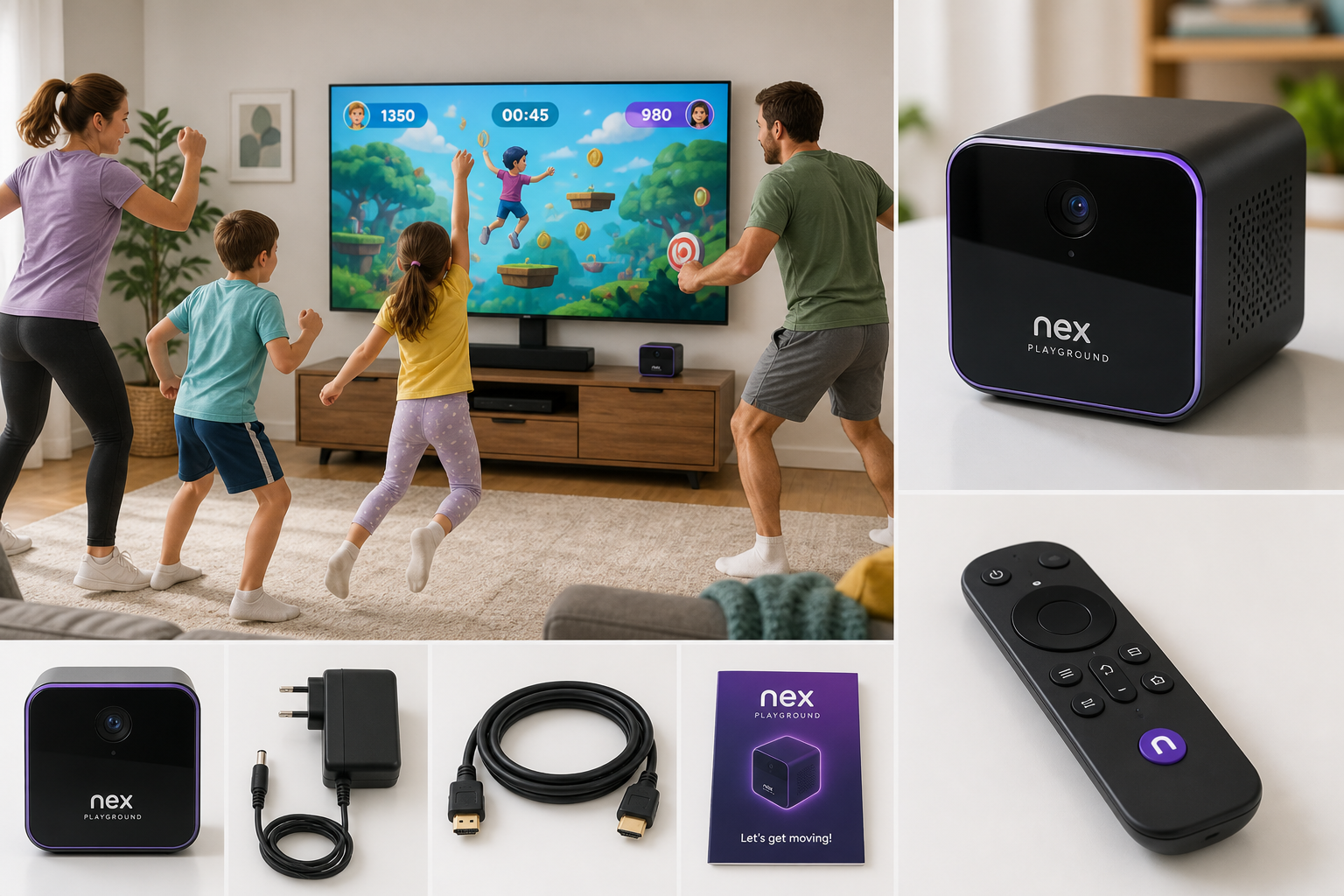
The Nex Playground – The Active Play System for Kids & Families is a dedicated motion-gaming device designed to get kids and adults moving together. Instead of handheld controllers or wearables, it uses an AI‑powered camera to track full‑body movement and translate it into on‑screen actions. The pitch is simple: turn any living room with a TV into an active play space that blends video games with real‑world movement.
This review focuses on how well Nex Playground delivers on that promise—looking at setup, everyday use, motion tracking, content library expectations, and overall value for families.
Note: Pricing can change, so treat the current cost of Nex Playground ($265.00 on Amazon at the time of writing) as a reference rather than a fixed amount.
Setup / Getting Started
What’s in the box
A typical Nex Playground package includes:
- The Nex Playground console (a compact cube‑style unit)
- Power adapter
- HDMI cable
- Remote control
- Quick‑start documentation
The hardware is intentionally small and minimalist. The console is meant to sit near your TV, with the camera facing the play area.
Physical placement
Getting good results with motion tracking depends heavily on how you set up the device and your room. In practice, setup involves:
-
Connecting to the TV
- Plug the HDMI cable from Nex Playground to an HDMI port on your TV.
- Connect the power adapter and place the unit near the TV, with the front camera facing the play space.
-
Positioning and distance
- Ensure there’s a clear view of the area where players will stand.
- Aim for enough distance so the camera can see full bodies—usually a few feet back from the TV stand.
- Remove obvious obstructions (coffee tables, large toys, etc.) that could block legs or arms from view.
-
Lighting considerations
- Nex Playground works best with even, moderate lighting.
- Avoid strong backlighting (like a bright window behind players) and very dim rooms.
- Overhead lighting is fine, as long as it doesn’t wash out the players or create strong glare.
-
Network & account setup
- Connect the system to Wi‑Fi during the guided setup.
- Create or sign into a Nex account.
- Expect a short initial update as the console installs the latest version of its PlayOS and built‑in games.
Overall, initial setup is straightforward—similar in complexity to plugging in a streaming box—though families may need a few minutes of trial and error to get ideal camera angle and room distance.
Daily Usage
Starting a play session
Day to day, using Nex Playground feels closer to turning on a streaming device than a full‑blown gaming console:
- Turn on the TV and select the Nex Playground’s HDMI input.
- Wake the system with the remote.
- Choose a profile or family member, then select a game from the main menu.
The remote is used mostly for navigation and menu choices; during games, your body is the main controller. Players usually stand several feet from the TV and follow prompts—jumping, dodging, dancing, or mimicking on‑screen movements.
Play styles and game types
While the specific library can evolve over time, the overall flavor of Nex Playground’s content is:
- Movement‑focused mini‑games: running in place, jumping, reaching, side‑stepping.
- Party and family games: multiple players taking turns, or playing simultaneously where the camera tracks more than one person.
- Kid‑oriented experiences: colorful visuals, simple mechanics, and short rounds suited to younger attention spans.
- Fitness‑adjacent play: light cardio and coordination rather than structured workout programs.
This makes Nex Playground best suited to:
- Young kids who need an outlet for energy indoors.
- Family game nights where the goal is shared activity and laughter more than competitive, high‑precision gaming.
- Short active breaks (e.g., before school or after homework) rather than long solo sessions.
Learning curve
Because the system tracks natural movement rather than button inputs, most children adapt quickly. Common onboarding experiences:
- Younger kids quickly understand that “if I jump, my character jumps.”
- Adults and older kids may need a few rounds to adjust to how precisely their motions are mirrored on screen.
- Having clear boundaries in the room (a rug edge or tape on the floor) helps players stay within the tracking area.
Overall, once the camera is positioned correctly, regular use is low‑friction: turn on, pick a game, start moving.
Performance & Reliability
Motion tracking
Nex Playground’s defining feature is its camera‑based motion tracking. In practice:
- Full‑body recognition: It detects players’ overall posture and gross movements (jumping, leaning, stepping, arm swings) reliably when they’re fully in view.
- Latency: On a modern TV with game mode enabled, input delay is generally low enough for family play. It may not satisfy competitive gamers accustomed to traditional controllers, but it’s adequate for casual movement games.
- Multiple players: The system can track multiple people in frame, though performance is best when players are not tightly crowded or blocking each other.
Compared with older motion systems:
- It feels more natural than holding a controller—no need to sync or charge extra hardware.
- Tracking is more forgiving than early camera systems but can still struggle when:
- Lighting is uneven or too dim.
- Players move too close to the camera.
- Pets or background movement are prominent.
Stability and software behavior
In typical use, software stability is acceptable:
- Games launch reliably after initial updates.
- Occasional recalibration screens or prompts to step back into the tracked area can appear, especially as kids drift closer to the TV.
- System updates run in the background but may require short downtime when installing.
Families using Nex Playground as a semi‑regular activity (a few times a week) are unlikely to encounter frequent crashes or serious technical issues, provided their Wi‑Fi connection is stable.
Physical durability
The console itself remains stationary near the TV, which minimizes wear and tear. The main durability concerns in a family environment are more practical:
- Ensuring the unit is placed where it won’t be kicked or knocked over during energetic sessions.
- Protecting the remote from drops and spills.
Because players don’t hold controllers or wear accessories, there are fewer moving parts to break compared with traditional console setups.
What Works Well
1. Genuinely active indoor play
Nex Playground succeeds at turning traditional screen time into movement‑based play. Kids and adults are encouraged to:
- Run in place
- Jump and dodge
- Reach, stretch, and balance
This makes it a strong option for:
- Rainy or cold days when outdoor play isn’t feasible.
- Families in apartments or smaller homes who still want active games.
- Parents looking for alternatives to sedentary TV or tablet sessions.
2. Low barrier to entry for families
Because it relies on natural movement and simple menus, the system is approachable for:
- Young children who can’t manage complex controllers.
- Grandparents or non‑gamers joining family game night.
- Mixed‑age groups where everyone can understand the basics quickly.
There’s no need to pair multiple controllers or track battery levels for motion wands; once set up, anyone stepping into the camera’s view can join the fun.
3. Compact hardware and minimal clutter
The small, cube‑like console design and single remote reduce clutter:
- One HDMI cable and one power cord.
- No extra sensors on stands or bar‑style camera accessories.
- No separate motion controllers or bands to store.
This is especially appealing for families trying to keep living areas tidy while still adding new tech.
4. Designed specifically for kids and families
Nex Playground’s user interface and game selection are built with families in mind:
- Bright, accessible visuals.
- Short, repeatable sessions that fit into busy schedules.
- Emphasis on cooperation, simple competition, and shared activity over complex gameplay depth.
For parents, this focus makes the system easier to trust as a family‑friendly device rather than a general‑purpose console where adult‑oriented content might be more prevalent.
What Could Be Improved
1. Reliance on room conditions
Because Nex Playground is camera‑based, its success depends heavily on your environment:
- Limited space can restrict movement and tracking.
- Poor lighting leads to inconsistent detection.
- Tight living rooms with furniture close to the TV may make optimal placement tricky.
Families with smaller or cluttered living spaces may need to rearrange furniture or define a dedicated play zone, which isn’t always convenient.
2. Depth for older or core gamers
While the system is ideal for younger kids and casual family sessions, more experienced gamers may find:
- Gameplay relatively shallow compared with console or PC titles.
- Limited appeal for solo play over long periods.
For households where teenagers or adults expect deeper progression systems or complex mechanics, Nex Playground is better framed as a supplemental active‑play device rather than a replacement for a traditional console.
3. Content model and expectations
Nex Playground emphasizes an evolving library of motion games. That can be a strength, but it also means:
- The long‑term value depends on how much your family engages with available titles and updates.
- Families who prefer owning specific games outright versus ongoing access to a library may wish there were more à‑la‑carte options.
Before purchase, it’s wise to:
- Review the current game lineup and age ratings.
- Consider how often your family realistically will use the system.
4. TV and input lag considerations
Because motion tracking is visual and continuous, any additional delay from your TV’s processing can become noticeable:
- Some TVs add latency with image enhancement features.
- Enabling game mode (if available) usually improves the feel of motion.
Families who don’t adjust these settings may mistakenly attribute sluggishness to the Nex hardware rather than their display.
Overall Impression
Nex Playground delivers on its core promise: it turns indoor screen time into active, full‑body play in a way that’s accessible for kids and fun for families. The hardware is compact, setup is relatively straightforward, and the motion tracking is good enough to support energetic, low‑friction sessions.
Its strengths are most obvious in households with:
- Young children who benefit from structured movement.
- Parents who want an easy, repeatable alternative to passive entertainment.
- Regular family game nights where simple, physical games fit the mood.
On the other hand, it’s less ideal as a sole gaming platform for older, core gamers who value depth, long‑form single‑player experiences, or fine‑grained control. It also demands a reasonably open and well‑lit living space to shine.
If your primary goal is more active, shared play at home, and you’re comfortable with a dedicated motion system built specifically for families, Nex Playground is a compelling option. For shoppers evaluating cost, keep in mind both the upfront hardware price (currently around $265.00 on Amazon) and the ongoing value you expect from its evolving library of motion‑based games.